
“Button Text Remains in Chinese” on Virtual Gift Card Page

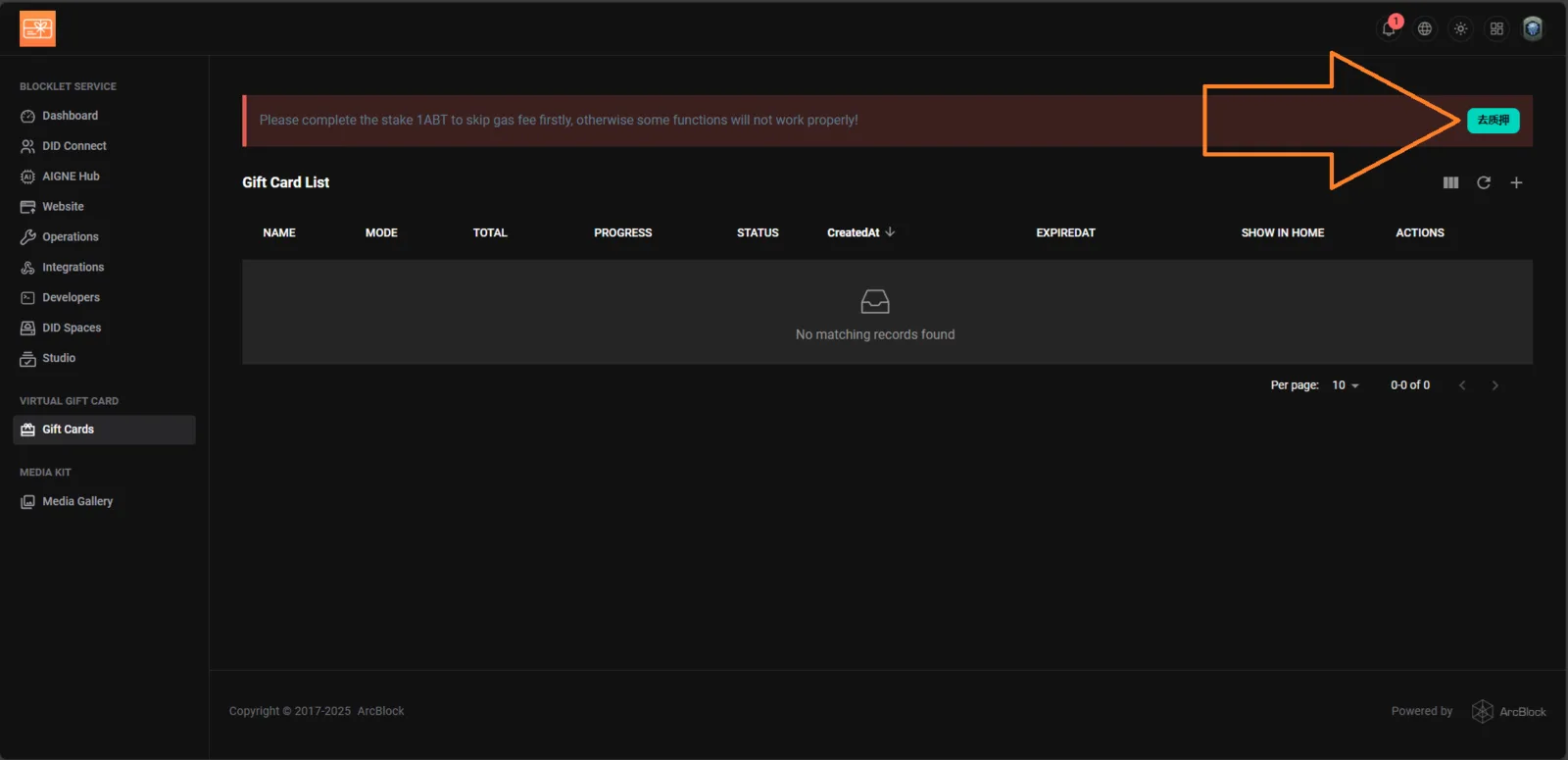
Platform: Blocklet Launcher / Gift Card Module Feature Affected: Virtual Gift Card → UI Language Display Device: PC (Web)
Description
The button displayed beside the red alert bar in the Virtual Gift Card section remains in Chinese, even when the interface language is set to English. This causes confusion for users who cannot understand the untranslated text.
Steps to Reproduce
- Log in to https://launcher.arcblock.io/.
- Navigate to Virtual Gift Card → Gift Cards.
- Observe the red alert message and the green button on the right.
- Notice that the button label is in Chinese (去质押) instead of English.
Expected Behavior
The button text should automatically translate to English when the system language is set to English. ✅ Suggested English translation:
“Go to Stake” or “Stake Now”
Actual Behavior
The button text remains untranslated in Chinese (去质押).
Impact
- Reduces accessibility and clarity for English-speaking users.
- May cause misunderstanding of required actions.