
Missing Model Selection Option: Unable to Switch Default AI to Gemini from "Chat with AI" Interface

Issue Description
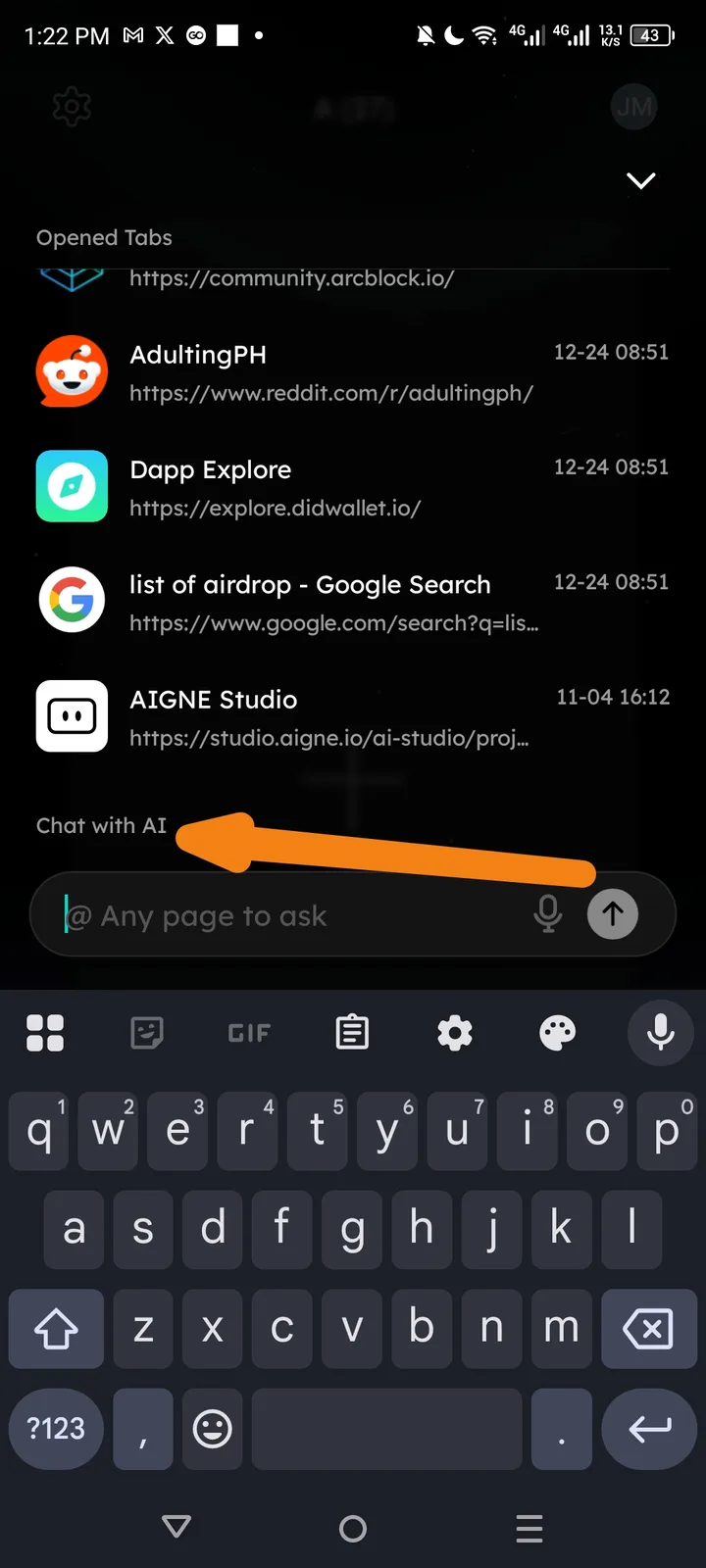
In the Arcsphere "Opened Tabs" view, the "Chat with AI" entry point defaults to GPT. There is currently no visible selector or option to immediately switch the model to Gemini before starting a prompt. Users are forced to use the default model rather than being able to choose their preferred model directly from this screen.
Impact
- User Friction: Users must start a chat with a model they don't want and then attempt to switch, or go deep into settings to find a global default.
- Preference Limitation: Users who specifically prefer Gemini for its capabilities (like speed or context) cannot access it conveniently.
- UI Inefficiency: The current interface lacks the flexibility expected in a multi-model AI browser.
Steps to Reproduce
- Open Arcsphere and view the Opened Tabs screen.
- Locate the "Chat with AI" section above the input bar.
- Observe that there is no clickable icon or dropdown menu to change the specific AI model (e.g., switching from GPT to Gemini).
- Tap the input bar; the interface remains locked to the default model without a quick-toggle option.
Recommended Fix
- Model Selector Icon: Add a small model icon (e.g., a Gemini or GPT logo) next to the "Chat with AI" text or inside the input bar that opens a quick-selection menu.
- Long-Press Toggle: Implement a long-press gesture on the send button or the input bar to quickly swap between recently used models.
- Sticky Defaults: If a user changes the model inside a chat, Arcsphere should remember that choice and apply it to the "Chat with AI" shortcut automatically for next time.