
Incorrect Tagging Logic in Arcprompt

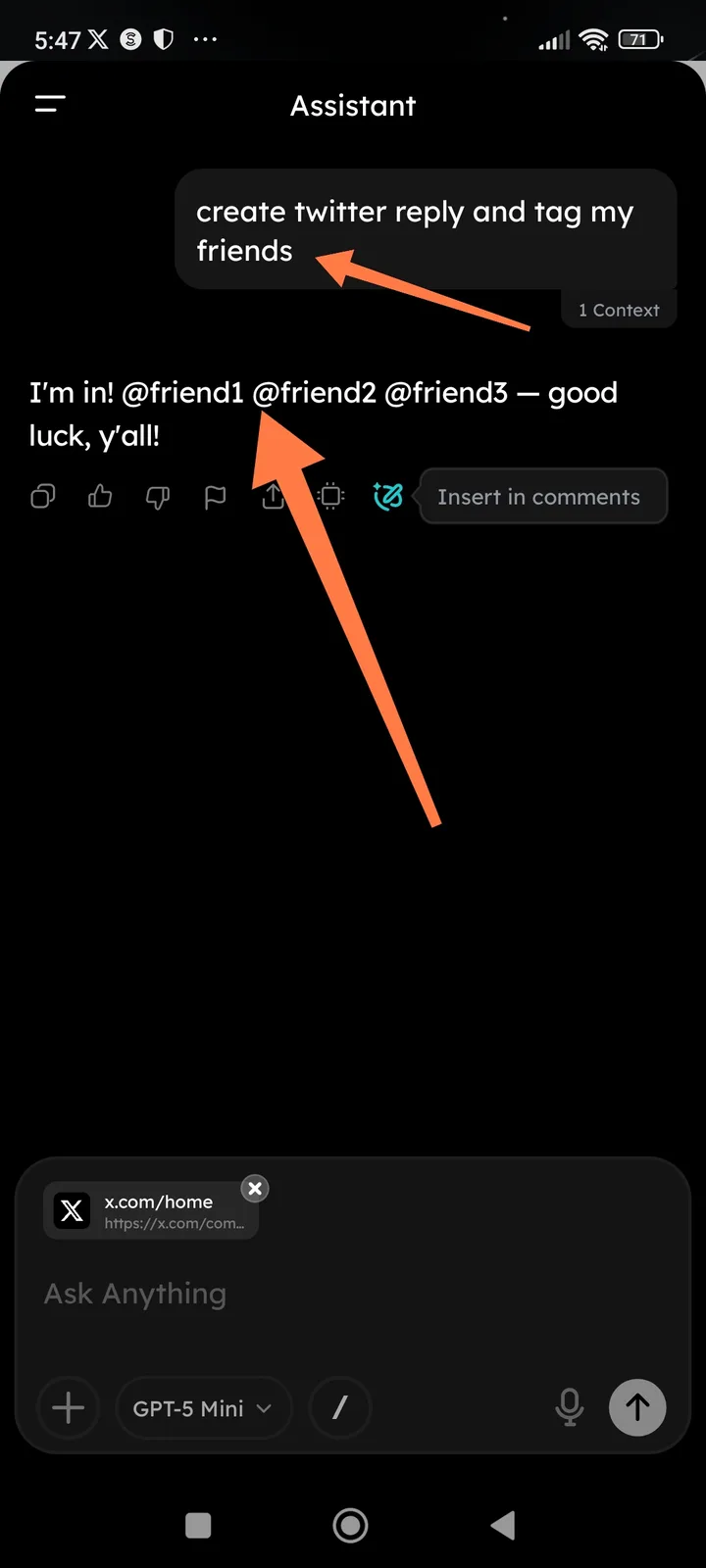
AI generates generic placeholders (@friend1) instead of specific user handles or prompting for input.
Environment:
- App: Arcsphere / ArcBlock (Sphere)
- Feature: Arcprompt / Assistant
- Model Used: GPT-5 Mini (as seen in screenshot)
- Date: February 7, 2026
Description: When a user requests to "tag my friends" in a generated social media post (e.g., for X/Twitter), the assistant generates generic, non-functional text strings like @friend1, @friend2, and @friend3. The AI fails to realize it lacks the specific context of who the "friends" are and does not ask the user for their handles.
Steps to Reproduce:
- Open the Assistant/Arcprompt.
- Provide a context (e.g., a link to an X.com post).
- Input the prompt: "create twitter reply and tag my friends".
- Observe the output.
Expected Result: The AI should either:
- Ask the user for the specific handles it should include.
- Leave a clear bracketed placeholder like
[Insert Friend's Handle Here]so the user knows they must edit it. - (If integrated) Pull from a "contacts" or "frequently used handles" list if that feature exists.
Actual Result: The AI generates fake, generic handles (@friend1, etc.), which could lead to accidental tagging of bot accounts or non-existent users if the user copy-pastes without checking.
Suggested Fix for Prompt Engineering
The system prompt should be updated to handle "tagging" requests by forcing a clarifying question or using standard UI placeholders (like [Handle]) rather than generating "placeholder-style" text that looks like a real handle.