
Misaligned Confirm Button & Unauthorized Editable Fields on Shared NFT Page

🧭 Affected Platform: ArcBlock Marketplace
📄 Affected Page: https://marketplace.arcblock.io/auctions/aea100b0-7f2a-4885-b0d4-cc57f31d8bd3
🧾 Summary
Two issues were observed on the NFT sale/auction page:
- UI Misalignment:
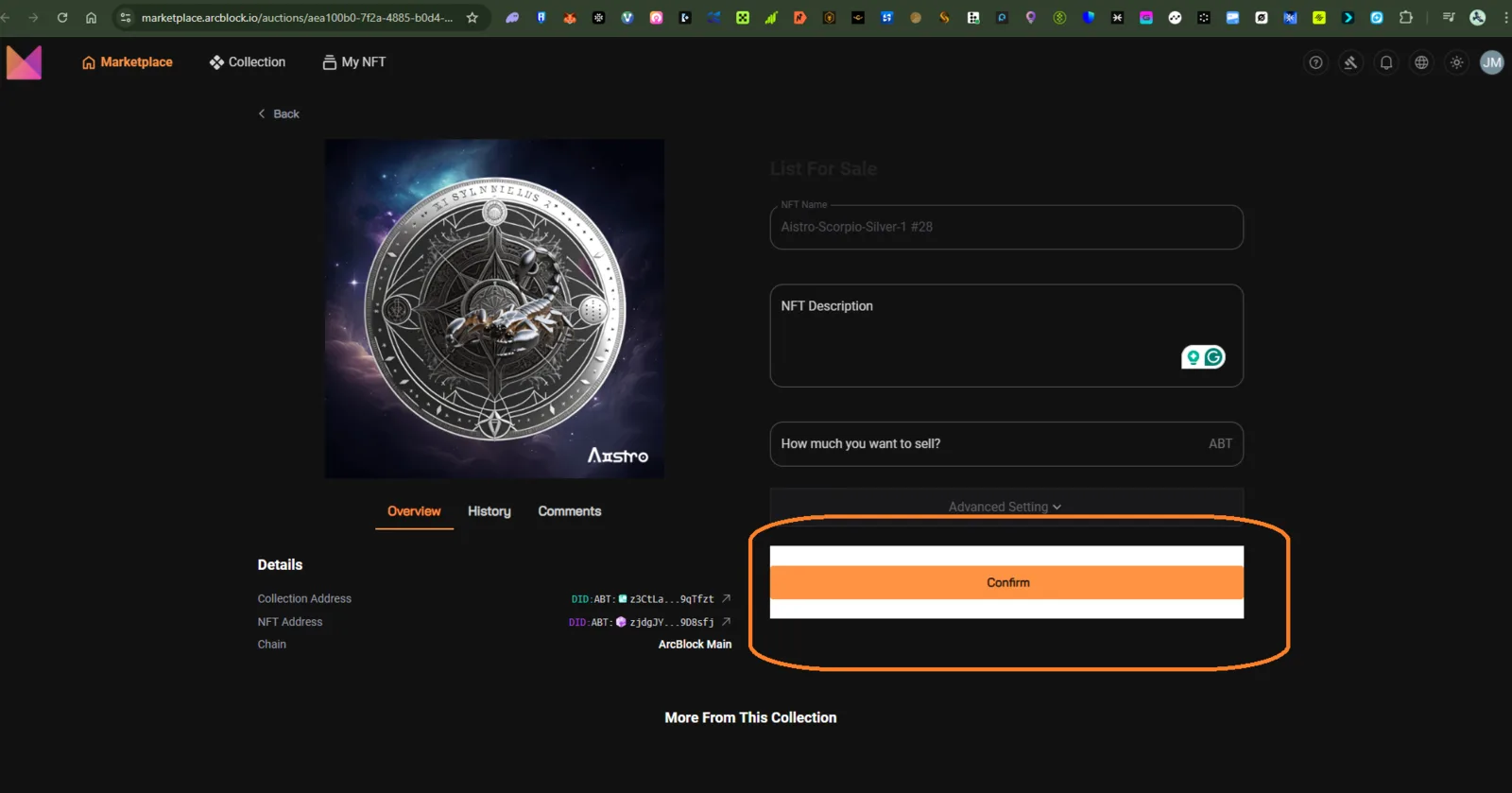
- The “Confirm” button appears misaligned, with a white gap above and below it.
- This breaks visual consistency on both dark and light themes.
- Unauthorized Editable Fields:
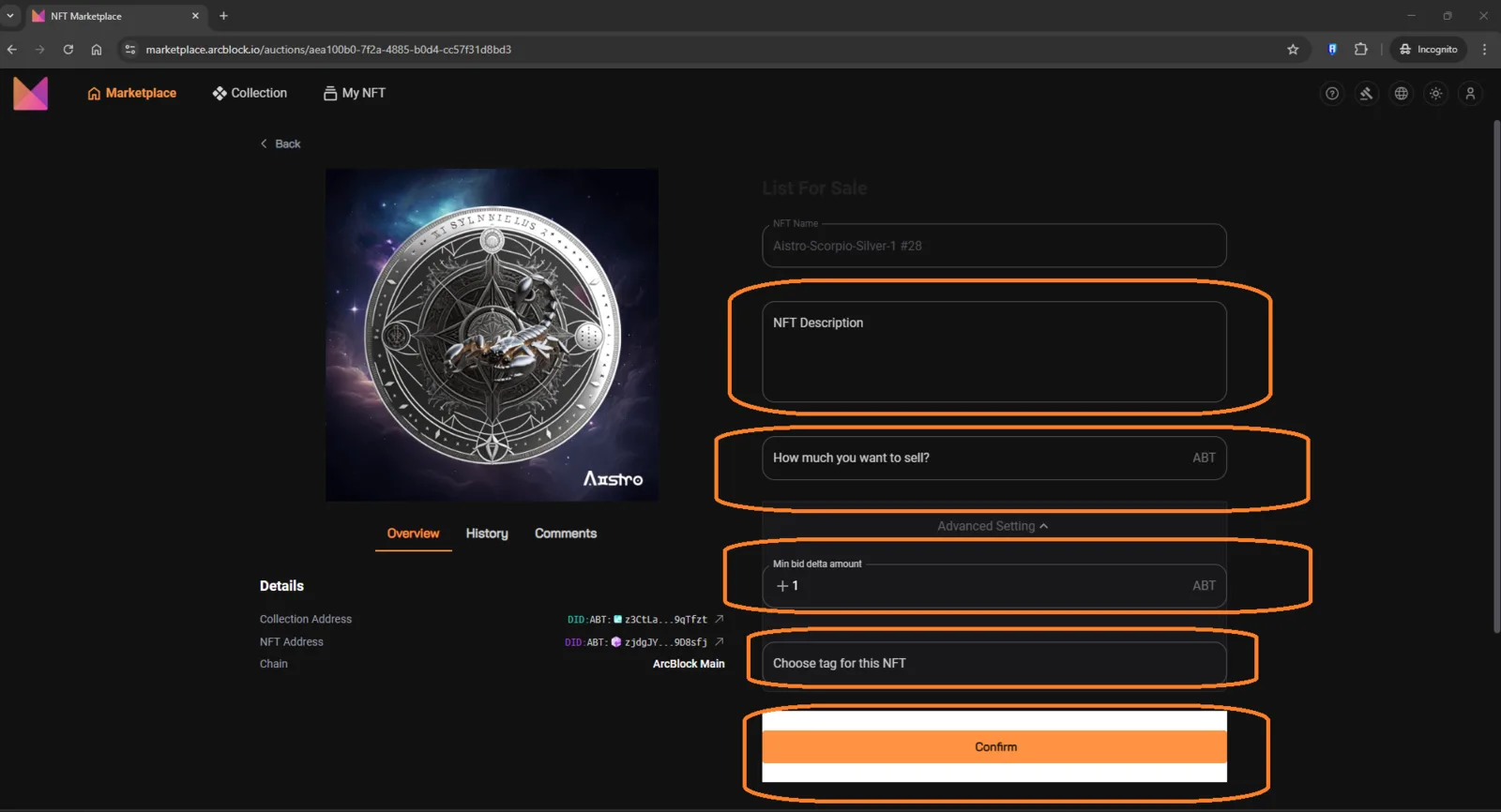
- When the link is shared with another user or opened in incognito mode, all the fields such as:
- NFT Description
- Advanced Setting
- Choose Tag for this NFT
- Confirm Button remain enabled and editable even if the viewer is not the NFT owner.
📱 Environment
| Parameter | Details |
|---|---|
| Device | Laptop / Desktop |
| Browser | Google Chrome (latest version) |
| OS | Windows 10 |
| Theme | Dark Mode |
| Connection | Stable (tested multiple times) |
🧪 Steps to Reproduce
Issue 1 — Confirm Button Misalignment
- Go to your NFT auction/sale page on ArcBlock Marketplace.
- Scroll down to the Confirm section.
- Observe the white rectangular gap above and below the orange button.
Issue 2 — Unauthorized Editable Fields
- Log in and navigate to your NFT sale page.
- Copy the link and share it with another user or open it in incognito mode.
- Observe that even without being logged in:
- All input fields remain enabled.
- The Confirm button remains clickable.
💥 Actual Results
- Visual: Confirm button is not properly aligned (white borders visible).
- Permission: Shared page allows unauthorized editing attempts of NFT listing fields.
✅ Expected Results
- Confirm button should be visually aligned with no gaps or background bleed.
- Non-owners or non-authenticated users should see a read-only version of the page:
- Disabled or hidden “Description,” “Advanced Settings,” “Tag,” and “Confirm” controls.
⚙️ Possible Causes
- Missing UI alignment rules for dark theme CSS class (e.g.,
button-containerpadding or margin). - Lack of ownership check or user authentication before enabling editable components.
💡 Suggested Fixes
UI Alignment
- Adjust padding/margin for the Confirm button container in CSS:
javascript .confirm-button { margin: 0; padding: 0; background-color: transparent; }
Access Control
- Add ownership verification logic before rendering editable fields:
javascript const isOwner = currentUserDid === nftOwnerDid; {isOwner ? <EditableSection /> : <ReadOnlySection />}
📂 Severity
| Type | Severity | Description |
|---|---|---|
| UI Bug | 🟡 Medium | Visual layout inconsistency |
| Access Control Bug | 🔴 High | Editable fields shown to unauthorized users |
🧩 Additional Notes
- Issue reproduced on both Desktop and Mobile browsers.
- Not related to caching or network delay.
- Recommended to audit similar NFT listing pages to confirm consistent field protection.