
Arcblock Session Management Shows Windows 10 Instead of Windows 11

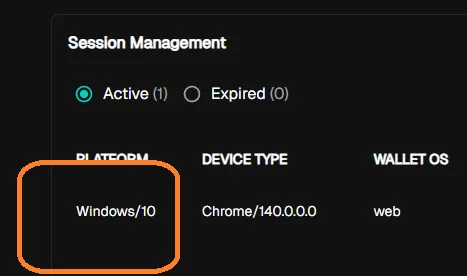
When viewing Session Management on Arcblock, the platform incorrectly displays Windows 10 as the operating system, even though the user is on Windows 11. This misrepresentation may lead to confusion about session security and device tracking.
Steps to Reproduce
- Log in to Arcblock.
- Navigate to Session Management.
- Observe that the Operating System field shows Windows 10, even though the user is on Windows 11.
Expected Behavior
- The Session Management section should accurately reflect the user’s actual OS (e.g., Windows 11).
Actual Behavior
- The OS is incorrectly displayed as Windows 10.
Severity Classification
Severity: Medium
- Misleading session tracking may reduce user trust in the platform’s security features.
- May indicate a flaw in user-agent parsing or session logging.
Environment
- Device: A520MHP
- OS: Windows 11
- Browser/App Version: Chrome v140.0.7339.81
1 条回复
As I know, Windows 11 and macOS will give the legacy system version.
We can't detect the correct version