
Discuss Kit now supports automatic post translation

We recently began testing an automated translation feature for posts in Discuss Kit. We are excited to share this feature with our community, enabling anyone to chat and post in their native language on our community site. This new translation feature uses AI technology built on AIGNE to ensure seamless communication regardless of language and geography.
Main Features
- Support for multilingual translations of posts and comments
- Provide two translation display modes: translate text only / original text comparison.
- Support for automation translation
- Real-time chat translation support
User Guide
Set your preferred language
- Login to Arcblock Community
- Click the personal avatar in the upper right corner
- Go to Profile → Settings → Select your preferred language
Translate Posts
- Translate All Posts and Comments: Click the translate button at the top of the post, then select the "Translate" button to translate the post and all comments.
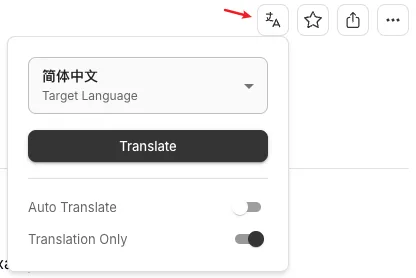
- Translation of a Single Comment: Click the translation button in the lower right corner of the comment to translate a specific comment (or display the original text)

Translation Display Mode
- Translation Only mode: displays only the translated text (default mode)
- Inline mode: displays both the original text and the translation simultaneously, facilitating comparison
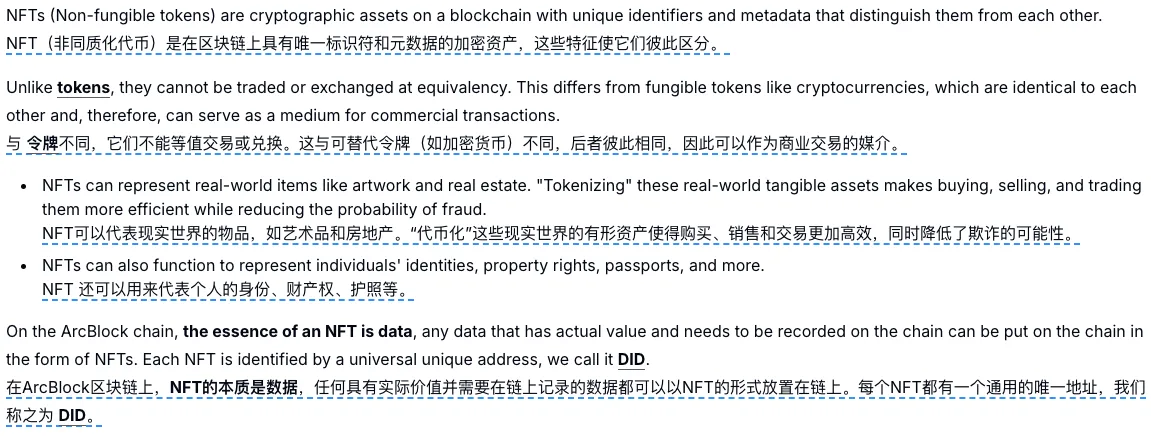
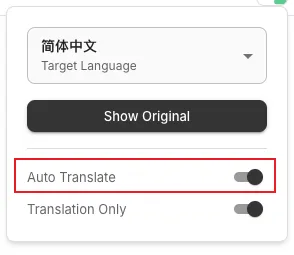
Automatic Translation Settings
It is highly recommended to enable the "Auto Translate" feature, as the system will automatically translate the content you browse, providing a smoother reading experience.
Real-time Chat Translation
The translation feature is also available in the Chat page. You can communicate freely in your native language, and the system will automatically translate messages into the other person's preferred language, making cross-language communication easy and natural.
📢 This feature is currently in a trial phase, and we greatly value your experience and feedback. If you have any suggestions or encounter any issues, please feel free to share them with us!
4 条回复
Here is a short video to show how the "automatic post translation" feature works:
太好了,终于可以沉浸式翻译了,试了比chrome和X的翻译体验更好
At the moment it only supports two real languages
Any other language do you want to support? please propose and we will configure the service.