
ArcBlock Community Allows Duplicate URL via Social Media Settings

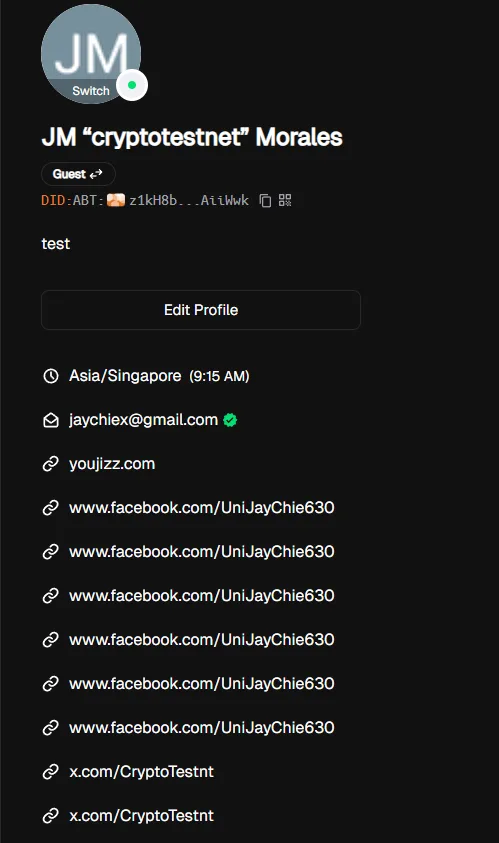
The ArcBlock Community platform allows users to add the same URL multiple times in the Social Media settings section. This results in duplicate entries being displayed on the user profile, which may lead to poor user experience, spam, or abuse.
Steps to Reproduce:
- Log in to ArcBlock Community.
- Navigate to User Settings → Social Media.
- In the social media link field, input a valid URL (e.g.,
https://www.facebook.com/UniJayChie630)..) - Save the changes.
- Re-enter the same URL again in another social media slot and save.
- Observe that duplicates are displayed on the profile.
Expected Result: The system should validate entries and prevent duplicate URLs from being added in the Social Media settings.
Actual Result: The platform accepts duplicate URLs, and they are displayed multiple times on the user profile.
Bug Description: The lack of duplicate URL validation in the social media field allows users to spam the same link multiple times. While not a direct security vulnerability, it can degrade user trust, clutter profiles, and potentially be abused for phishing or malicious link amplification.
Severity Classification:
- Severity Level: 🟠 Medium
- Profile spam & reduced credibility.
- Risk of malicious link duplication.
- UX degradation.
Suggested Fix:
- Add validation to block duplicate URLs in the Social Media field.
- Normalize input (trim spaces, force lowercase) before comparison.
- Display a clear error message: “This URL is already linked to your profile.”
Environment
- Device: A520MHP
- OS: Windows 11
- Browser/App Version: Chrome v140.0.7339.81