
File/Bucket Name Overflow

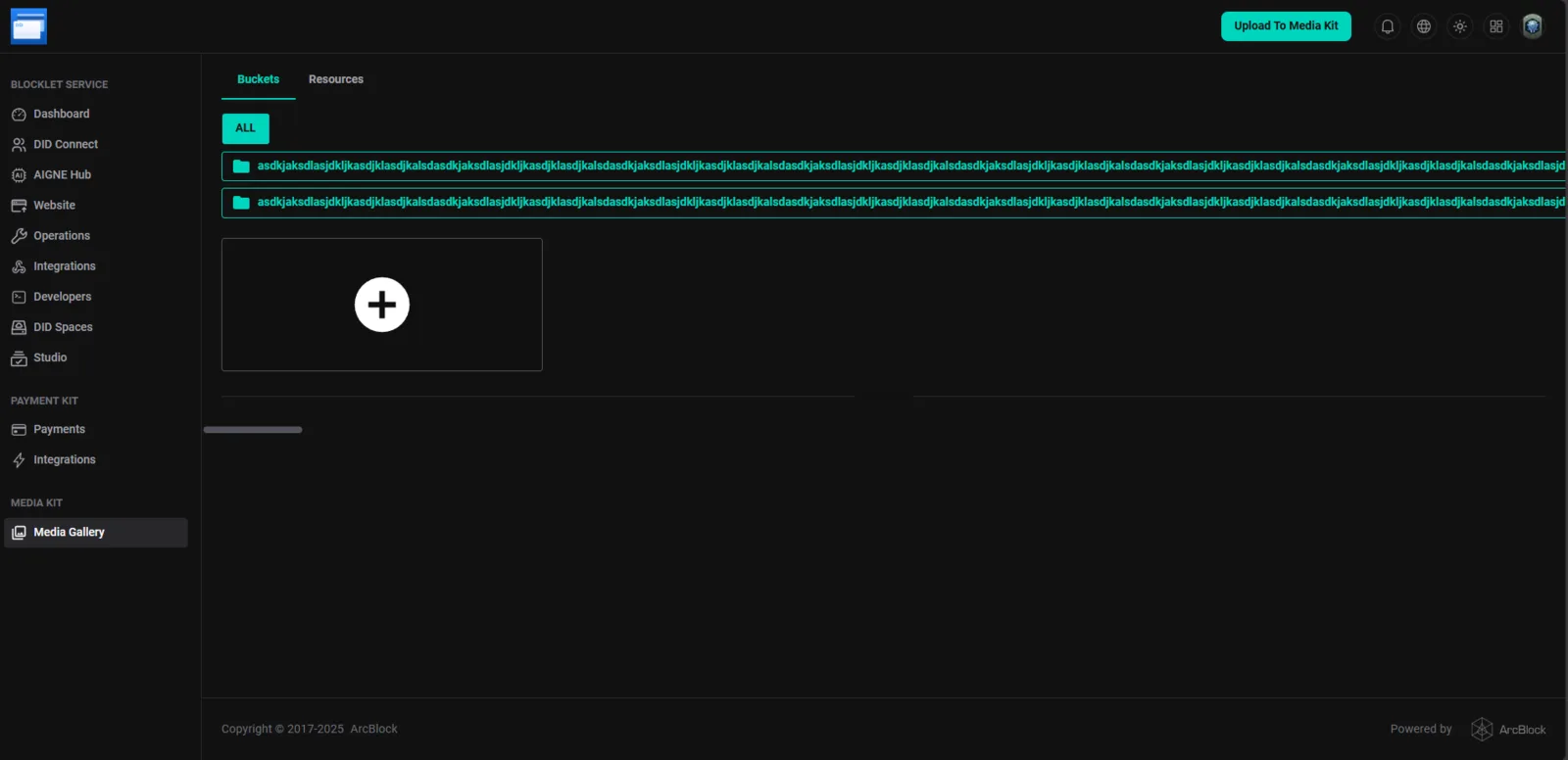
Product/Feature: Blocklet Service - Media Kit (Media Gallery)
Severity: Medium to High (High impact on usability for users with long file/bucket names)
Status: Open
1. Description
When a file or bucket name in the "Media Gallery" section of the Media Kit is excessively long, the name overflows the boundaries of its container. This causes the text to extend horizontally across the dashboard, potentially obscuring other elements or requiring excessive horizontal scrolling, which severely impacts the user experience.
The issue appears to be a lack of proper text wrapping or truncation with an ellipsis (...) for long names.
2. Steps to Reproduce
- Navigate to the Media Kit section and select Media Gallery.
- Create or upload a file/bucket with a very long name (e.g., the placeholder name used in the image:
asdkjaksdlasjdkljkasdjklasdjkalsdasdkjaksdlasjdkljkasdjklasdjkalsdasdkjaksdlasjdkljkasdjklasdjkalsdasdkjaksdlasjdkljkasdjklasdjkalsdasdkjaksdlasjdkljkasdjklasdjkalsdasdkjaksdlasjdkljkasdjklasdjkalsdasdkjaksdlasjd). - Observe the display of the file/bucket name.
3. Expected Result
Long file or bucket names should be handled gracefully within the UI container. This is typically achieved by:
- Truncation: Cutting off the name and adding an ellipsis (
...) at the end (e.g.,asdkjaksdlasjdkljkasdjklasdjkalsdasdkjaksdlasjd...). The full name should be visible on hover (tooltip). - Text Wrapping: Allowing the text to wrap to the next line if the container size permits, although truncation is usually preferred for list views.
4. Actual Result
The long file/bucket name extends far beyond the visible area of the main content panel, creating a horizontal overflow that disrupts the layout.