
Missing "Always Allow" Option for ArcPrompt Link Opening

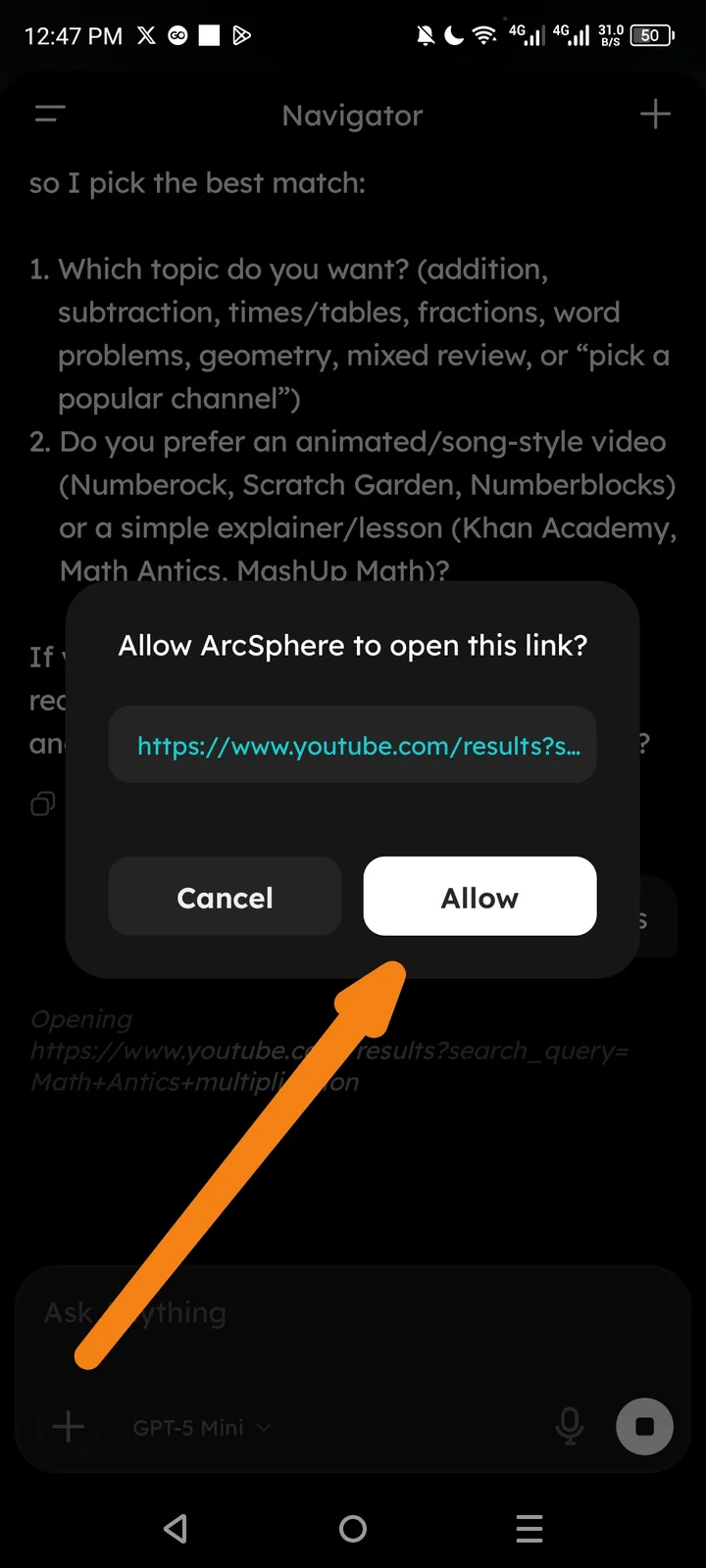
- App/Feature: Arcsphere - ArcPrompt / Link Handling
- Issue: No automatic/remembered permission option for opening external links.
- Description: When ArcPrompt attempts to open an external link, a permission dialog appears with only "Cancel" and "Allow" options. There is no "Always allow" or "Don't ask again" checkbox/option. This forces the user to manually click "Allow" every time a link is opened, even if they have previously commanded the AI to automatically allow opening links.
- Expected Behavior: The dialog should include an option such as:
- A checkbox for "Remember my choice" or "Always allow ArcSphere to open links"
- OR a third button: "Always Allow"
- Actual Behavior: The user must manually approve each link opening individually, creating friction when multiple links need to be opened or when the user has already instructed the AI to handle links automatically.
- Screen: ArcPrompt conversation with link opening permission dialog.
- Suggested Fix: Add a persistent setting or checkbox in the permission dialog to remember the user's preference for future link openings.