
Gift Card Creation UI and Functionality Issues

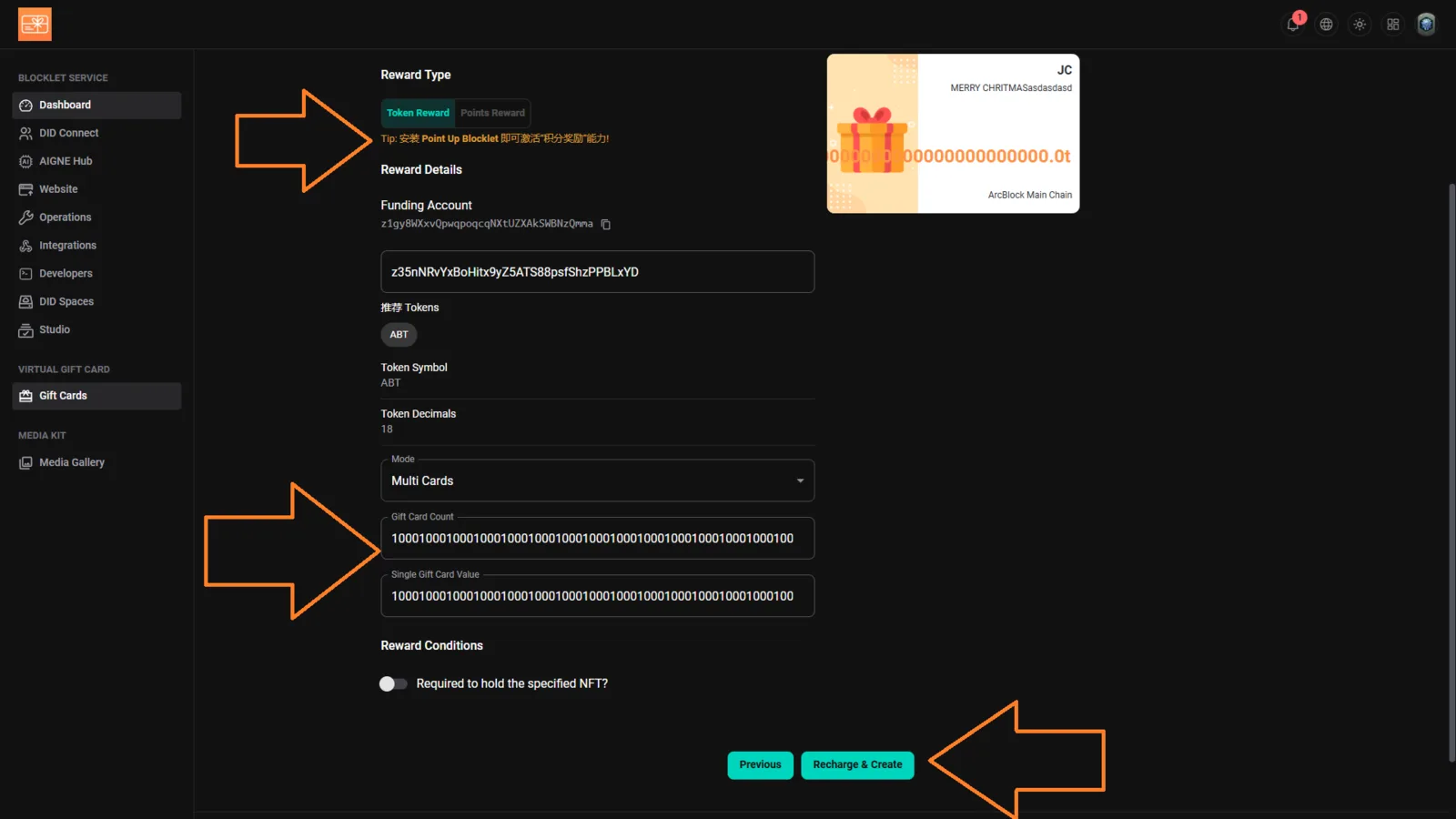
Platform: Blocklet Launcher – Virtual Gift Card Module
Page: Gift Cards → Reward Details
Device: PC
Browser: Chrome
Description
Multiple issues found on the Virtual Gift Card creation page:
- Chinese Text Appearing in UI – The tooltip under “Reward Type” and some labels contain untranslated Chinese text (e.g., “Tip: 安装 Point up Blocklet 即可激活积分发放能力!”).
- Input Validation Missing – “Gift Card Count” and “Single Gift Card Value” fields allow extremely long numeric strings without any validation or error handling.
- Recharge & Create Button Non-functional / No Feedback – Clicking Recharge & Create does not trigger any confirmation, validation, or success/error message, making it unclear whether the operation succeeded or failed.
Steps to Reproduce
- Go to: https://launcher.arcblock.io/
- Navigate to Virtual Gift Card → Create Gift Card
- Observe the untranslated Chinese text
- Enter very large numeric values in both
- Gift Card Count
- Single Gift Card Value
- Click Recharge & Create
Expected Behavior
- All UI elements should be displayed in English.
- Input fields should have validation limits (e.g., max 10 digits).
- Clicking Recharge & Create should show a clear message: success, failure, or input error.
Actual Behavior
- Chinese text visible in English UI.
- Input accepts long, unrealistic values (causes lag or potential crash).
- Button provides no feedback or response after clicking.
Impact
- Poor user experience and accessibility
- Potential backend overload or input validation vulnerabilities