If a media resource is uploaded from other blocklets than Media Kit, it cannot be deleted or moved.
Because Media Kit has no way of knowing if the resource is being used properly, and if it supports deletion, then all other blocklets will lose the resource.
But there should be a folder icon reminder in the bottom right corner, this looks a bit problematic, I'll fix it later.
WGwgring2年前(edited)
Ok, been looking for a way to delete things for a while and other than certain options not there (feature of delete folder being one) those options have been grayed out for a while.
I even looked through didspaces itself and the apps in question to see if I could delete files or folders from there but there definitely weren't options for that anywhere I looked. Storage section is obviously for personal uploads outside of blocklets/mediakit, but browsing app files is what I mean because my storage section shows blank as expected.
YLYongzhuo Liang2年前
I've fixed the folder icon, so you should be able to visualize that it's a media resource uploaded by another Blocklet.
WGwgring2年前
I guess i shouldve mentioned that was in the Buckets view, or will that apply there as well?
YLYongzhuo Liang2年前(edited)
Yes, only Buckets view
WGwgring2年前
It's still grayed out after updating the component 🤔
YLYongzhuo Liang2年前
Because these two images were uploaded through Pages Kit and AI Studio, Media Kit does not have the right to delete them.
Media Kit can only delete its own uploaded media resources, if it can delete media resources uploaded by other Blocklets, it will be easy to delete them by mistake and break the media.
WGwgring2年前
For the first image in particular being the generated AI dall image, it doesnt exist in the area where I had tested making it. How would I delete it? And as for the preinstalled templates and images, they too were created in such a way that wouldnt be able to be deleted either.
Meaning, I can go into pageskit and view or attach that image again, but theres no way to delete it there either. Another image is of a display for a nft factory, which of course I wouldnt want to delete.
Uploading a new image i am able to delete, but anything prior I see no way to remove those items or folders. One folder that I know i created in media kit doesnt have the option either. Seems to be anything prior to the update Im unable to delete or even move to a new folder. New uploads work fine, new folder still doesnt have a delete option.
YLYongzhuo Liang2年前(edited)
The 1.14 MB image is the logo of the AI Studio preset template project, and I remember that there are several other logos that were automatically uploaded to the Media Kit when AI Studio was initialized, so they can't be deleted.
The 3.15MB image looks like it was generated in Pages Kit via the Uploader - AI Image Plugin?
Both of the above images cannot be deleted, as it belongs to another Blocklet.
And the folder cannot be deleted either.
WGwgring2年前(edited)
How can it be deleted though? After a while that could add up or also just be a waste of storage space if not thinking to generate everything in media kit first? 🤔
I have 2 folders already I wont ever use 😂
WGwgring2年前
I can understand not being able to delete something from discusskit/media kit if it was a guest/member making the content because what i upload here doesnt get stored on my spaces, but if i myself use the generative ai image option in my own blocklets or my discusskit, how can i as the owner delete it from storage entirely? There really should be a way to do this otherwise space will fill up in ways that cant ever be deleted
WGwgring2年前
After uploading a new image into media kit and moving it to the AI Studio folder, I'm now unable to move it again or delete it. This doesnt apply to folders ive created as I tested that as well. Yes they're small images, but theyre forever stuck and cant be moved or deleted
YLYongzhuo Liang2年前
The files stored by Meida Kit are currently stored locally on the server and are not uploaded to DID Spaces, which may be a concern for you.
As for opening up the ability to delete media resources from other Blocklets, user misuse needs to be evaluated, and perhaps the concept of a recycle bin should be introduced so that media resources that have not been recovered for more than 7 days are automatically deleted?
As for the function you mentioned that folder can't be deleted after transferring, it should no longer exist after the above modification is completed.
YLYongzhuo Liang2年前
However, this demand modification is not as fast as it could be handled, and it is expected to be delivered properly in 2024 Q1
YLYongzhuo Liang2年前
I've created a corresponding issue, and I'll update this post as I make progress.
I love the recycle bin idea, and as for user misuse:
an image uploaded/generated by a user should not be able to be deleted by me the owner, as the discusskit is a service im providing. limits on storage (quota) per user/role would be a nice feature as well for this, so it would limit malicious postings 🤔
the quotas would be similar to the function of "max character limit" for text in posts, just for data retention.
so to check this i made a comment on a post in the discusskit im running, with an image uploaded. checked if it showed in the image bin and yes it does, as it should, with me unable to delete it as the owner/admin. i deleted the post yet the image remains. quotas and user ability to send to recycle bin (or automatic on comment/post deletion) would be very nice yes


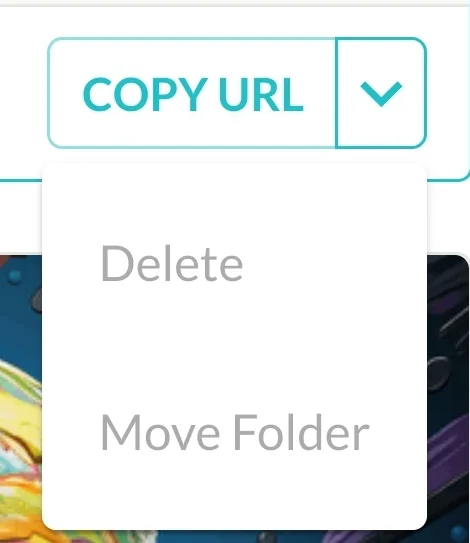 Grayed out
16 条回复
If a media resource is uploaded from other blocklets than Media Kit, it cannot be deleted or moved.
Because Media Kit has no way of knowing if the resource is being used properly, and if it supports deletion, then all other blocklets will lose the resource.
But there should be a folder icon reminder in the bottom right corner, this looks a bit problematic, I'll fix it later.
Ok, been looking for a way to delete things for a while and other than certain options not there (feature of delete folder being one) those options have been grayed out for a while.
I even looked through didspaces itself and the apps in question to see if I could delete files or folders from there but there definitely weren't options for that anywhere I looked. Storage section is obviously for personal uploads outside of blocklets/mediakit, but browsing app files is what I mean because my storage section shows blank as expected.
I've fixed the folder icon, so you should be able to visualize that it's a media resource uploaded by another Blocklet.
I guess i shouldve mentioned that was in the Buckets view, or will that apply there as well?
Yes, only Buckets view
It's still grayed out after updating the component 🤔
Because these two images were uploaded through Pages Kit and AI Studio, Media Kit does not have the right to delete them.
Media Kit can only delete its own uploaded media resources, if it can delete media resources uploaded by other Blocklets, it will be easy to delete them by mistake and break the media.
For the first image in particular being the generated AI dall image, it doesnt exist in the area where I had tested making it. How would I delete it? And as for the preinstalled templates and images, they too were created in such a way that wouldnt be able to be deleted either.
Meaning, I can go into pageskit and view or attach that image again, but theres no way to delete it there either. Another image is of a display for a nft factory, which of course I wouldnt want to delete.
Uploading a new image i am able to delete, but anything prior I see no way to remove those items or folders. One folder that I know i created in media kit doesnt have the option either. Seems to be anything prior to the update Im unable to delete or even move to a new folder. New uploads work fine, new folder still doesnt have a delete option.
The 1.14 MB image is the logo of the AI Studio preset template project, and I remember that there are several other logos that were automatically uploaded to the Media Kit when AI Studio was initialized, so they can't be deleted.
The 3.15MB image looks like it was generated in Pages Kit via the Uploader - AI Image Plugin?
Both of the above images cannot be deleted, as it belongs to another Blocklet.
And the folder cannot be deleted either.
How can it be deleted though? After a while that could add up or also just be a waste of storage space if not thinking to generate everything in media kit first? 🤔
I have 2 folders already I wont ever use 😂
I can understand not being able to delete something from discusskit/media kit if it was a guest/member making the content because what i upload here doesnt get stored on my spaces, but if i myself use the generative ai image option in my own blocklets or my discusskit, how can i as the owner delete it from storage entirely? There really should be a way to do this otherwise space will fill up in ways that cant ever be deleted
After uploading a new image into media kit and moving it to the AI Studio folder, I'm now unable to move it again or delete it. This doesnt apply to folders ive created as I tested that as well. Yes they're small images, but theyre forever stuck and cant be moved or deleted
The files stored by Meida Kit are currently stored locally on the server and are not uploaded to DID Spaces, which may be a concern for you.
As for opening up the ability to delete media resources from other Blocklets, user misuse needs to be evaluated, and perhaps the concept of a recycle bin should be introduced so that media resources that have not been recovered for more than 7 days are automatically deleted?
As for the function you mentioned that folder can't be deleted after transferring, it should no longer exist after the above modification is completed.
However, this demand modification is not as fast as it could be handled, and it is expected to be delivered properly in 2024 Q1
I've created a corresponding issue, and I'll update this post as I make progress.
[ Feature ]: 用户需要更加合理的删除资源的方法,避免 server 无限存储文件 · Issue #209 · blocklet/image-bin
I love the recycle bin idea, and as for user misuse:
an image uploaded/generated by a user should not be able to be deleted by me the owner, as the discusskit is a service im providing. limits on storage (quota) per user/role would be a nice feature as well for this, so it would limit malicious postings 🤔
the quotas would be similar to the function of "max character limit" for text in posts, just for data retention.
so to check this i made a comment on a post in the discusskit im running, with an image uploaded. checked if it showed in the image bin and yes it does, as it should, with me unable to delete it as the owner/admin. i deleted the post yet the image remains. quotas and user ability to send to recycle bin (or automatic on comment/post deletion) would be very nice yes