
“Edited” Text Not Visible in Dark Mode

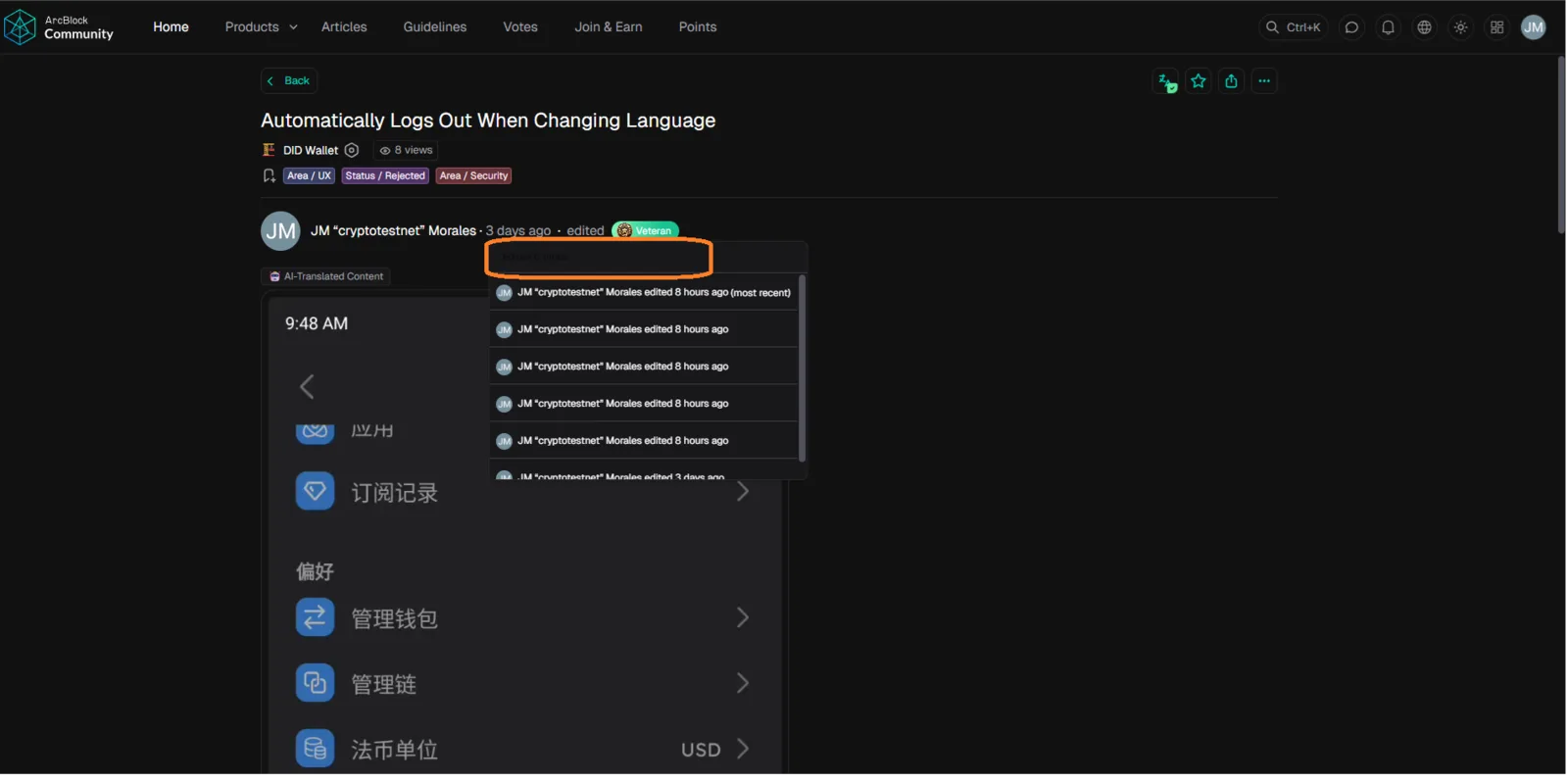
🌐 Platform: ArcBlock Community
⚙️ Severity: Low to Medium 🎨 Category: UI/UX – Dark Mode / Text Visibility
🧩 Description:
When viewing the discussion in Dark Mode, the “Edited” label (e.g., “Edited 6 times”) becomes nearly invisible or blends with the background color. This makes it hard for users to notice or read the edit history indicator.
🪜 Steps to Reproduce:
- Go to the link: 👉 https://community.arcblock.io/discussions/132bc67f-5028-49f4-a480-1e7c203202ae
- Enable Dark Mode in your browser or platform settings.
- Locate the “Edited” text near the post or comment timestamp (e.g., “Edited 6 times”).
- Observe the color and visibility of the text.
✅ Expected Result:
- The “Edited” text should remain clearly visible and readable in both light and dark modes.
- Text color should automatically adjust (e.g., light gray or blue on dark backgrounds).
❌ Actual Result:
- In Dark Mode, the “Edited” label becomes too dark or invisible.
- The text blends into the background, reducing readability.
- Users may not notice post edits or history indicators.
⚠️ Impact:
- Affects user awareness of content edits.
- Reduces UI consistency and readability in dark mode.
- Minor accessibility issue for users relying on visual cues.
🔍 Possible Cause:
- The “Edited” label likely uses a static dark color value (e.g.,
#333or#555) not adapted for dark theme. - Missing CSS variable or theme-based color assignment in dark mode styles.
🧰 Suggested Fix:
- Apply dynamic color variables for text labels in dark mode (e.g.,
var(--text-secondary-dark)). - Use contrast-compliant colors (e.g., light gray or accent blue).
- Test visibility under both light and dark themes.