
“0” Displayed on Secret Phrase Input Field

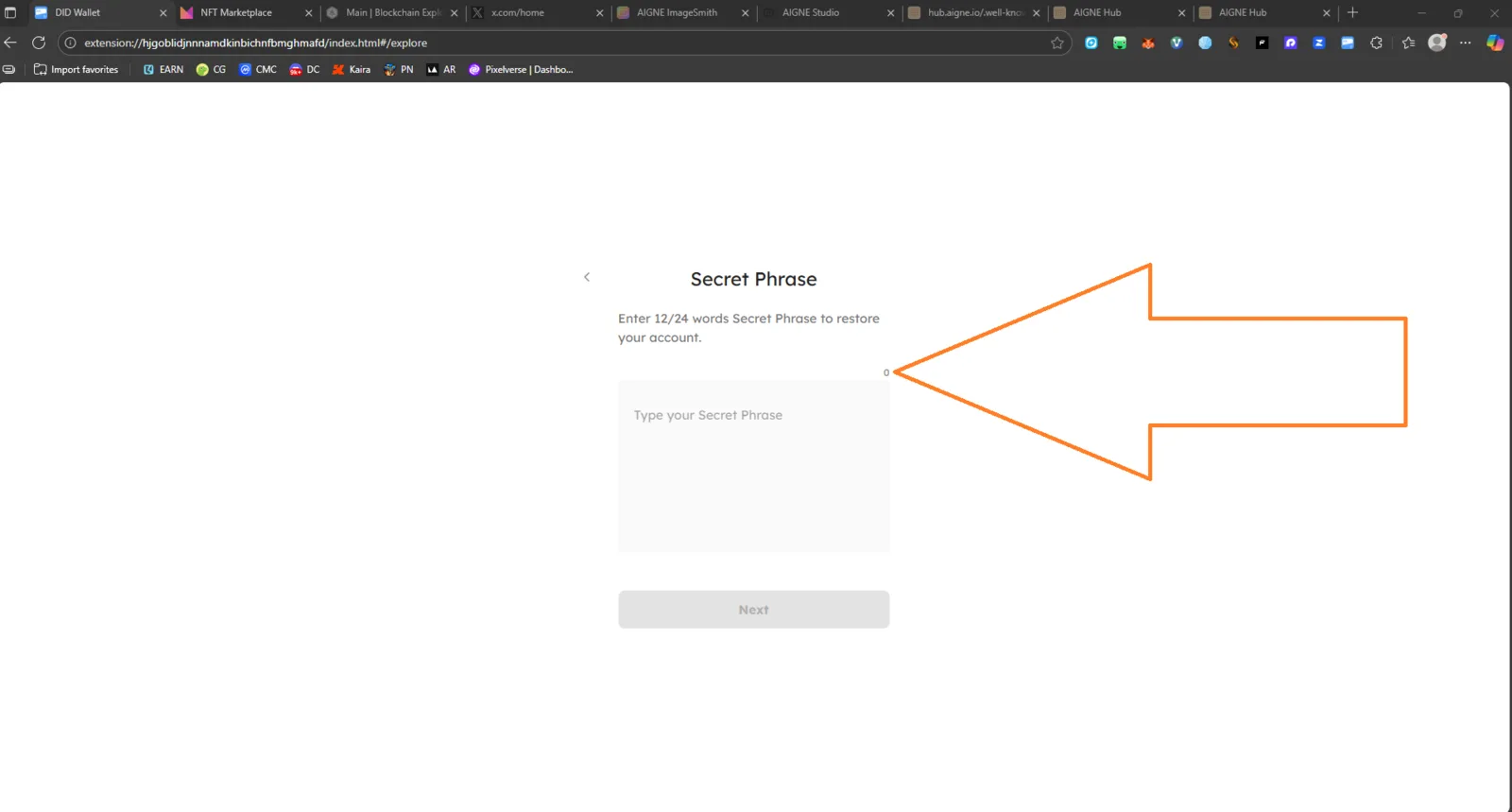
Issue Summary: When using the Forgot Password → Restore Wallet via Secret Phrase option, a “0” appears near the input field before any words are entered. The number remains visible even though no text has been typed.
Steps to Reproduce:
- Open the DID Wallet Browser Extension.
- Select Forgot Password.
- Choose the Secret Phrase recovery option.
- Observe the input box — a “0” appears at the right edge of the input area.
Expected Behavior:
- The “0” counter or indicator should not appear until the user starts typing their secret phrase.
- The input field should be clean and blank on load.
Actual Behavior:
- A “0” is shown by default next to the text field, likely due to a pre-rendered counter element.
- The number does not correspond to any actual user input.
Impact:
- 🧠 Causes confusion — users may think there’s a validation or counting error.
- 💻 Reduces trust in the wallet recovery UI.
Possible Technical Cause:
- The word count component for the Secret Phrase input likely initializes to
0and renders immediately instead of being hidden until a phrase is entered.
Severity: 🟡 Low (UI Bug) — Cosmetic issue, does not block functionality but negatively affects UX.