
ArcBlock Logo Missing in Dark Mode

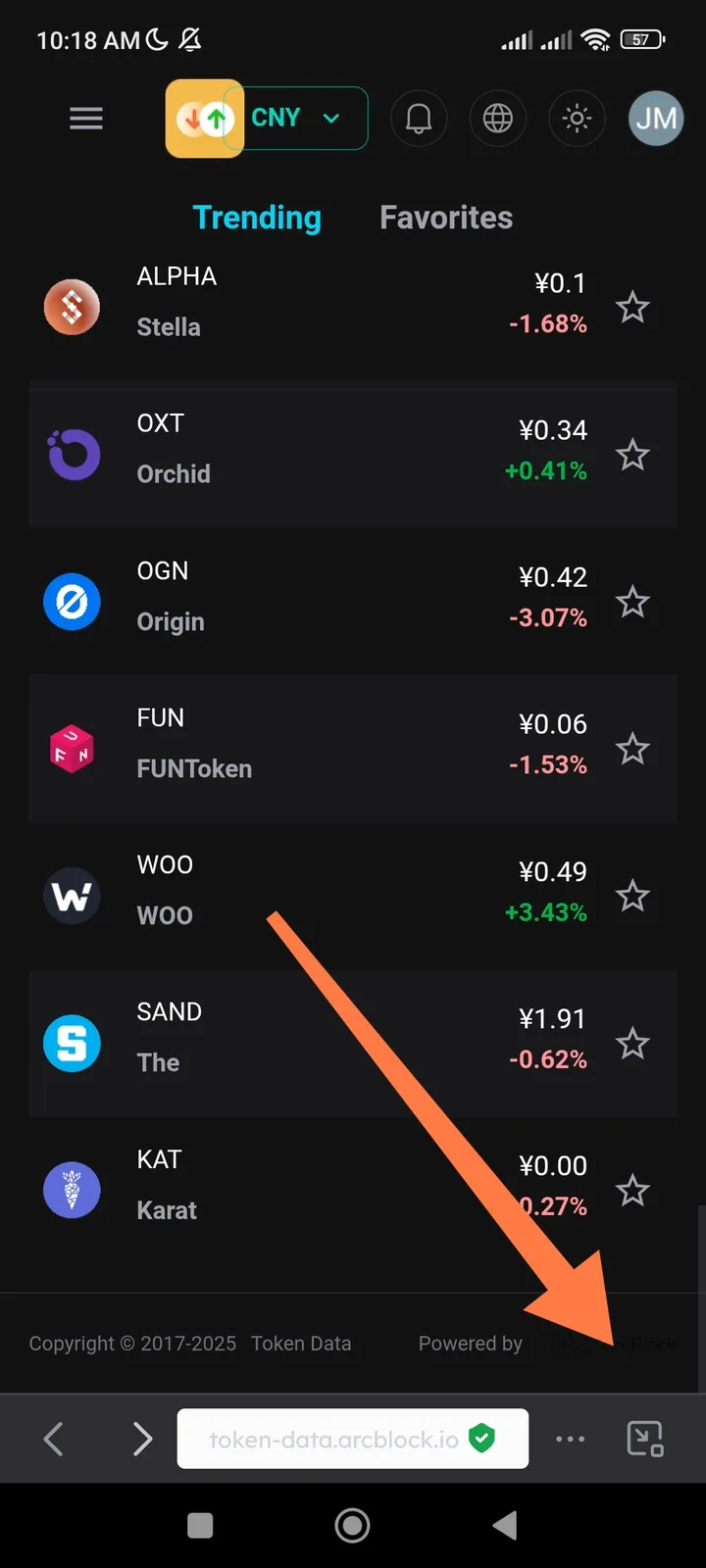
🧾 Summary: When switching the Token Data application of DID Wallet to Dark Mode, the ArcBlock logo disappears or becomes invisible on the dark background.
🧪 Steps to Reproduce:
- Open the DID Wallet.
- Go to the Token Data application.
- Switch the theme from Light Mode to Dark Mode.
- Observe the ArcBlock logo area.
💥 Actual Result:
- The ArcBlock logo is missing or not visible when Dark Mode is active.
✅ Expected Result:
- The ArcBlock logo should remain visible in both Light and Dark modes.
- The app should use a light-colored (white) version of the logo in Dark Mode for contrast.
⚙️ Possible Cause:
- Dark Mode CSS or theme configuration doesn’t include a visible logo variant.
- The logo asset color blends with the background.
📂 Category: UI / Theme / Branding 🧱 Severity: 🟠 Medium (Affects branding visibility) 🎯 Priority: Medium