
Missing Confirmation When Removing Favorite

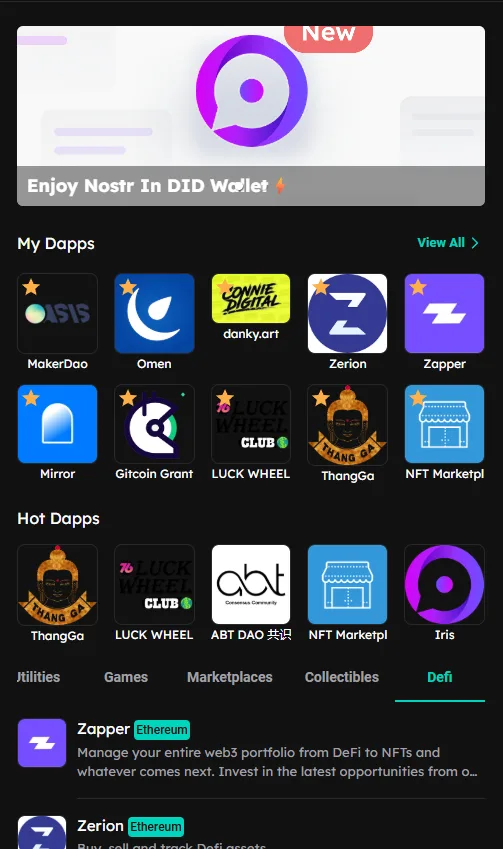
Product: DID Wallet Explorer URL: https://explore.didwallet.io/ Environment:
- Device: Desktop (Windows 11)
- Browser: Chrome (latest version)
- Theme: Dark
- Wallet: DID Wallet connected
🧾 Description
When clicking on the favorite icon (★) for a dApp that’s already favorited, the system immediately redirects to the dApp’s external page (e.g., https://marketplace.arcblock.io/)) instead of asking for user confirmation to remove it from favorites.
🔁 Steps to Reproduce
- Go to https://explore.didwallet.io/.
- Favorite any dApp (e.g., “NFT Marketplace” or “Zapper”).
- Once favorited, click the star icon again.
- Observe that it redirects to the dApp website instead of showing a confirmation dialog.
✅ Expected Behavior
When a user clicks the favorite icon again, a confirmation dialog should appear:
“Do you want to remove this from favorites?” [Yes] [No]
Only after confirming “Yes” should the app unfavorite and update the UI.
❌ Actual Behavior
Clicking the favorite icon again immediately redirects to the external dApp page, causing confusion and potential misclicks.
📊 Impact
- Users may accidentally remove favorites without realizing it.
- Confusing UX — favorite icon behaves inconsistently with expected patterns.
- Disrupts user workflow by forcing navigation to external pages.
🧰 Suggested Fix
- Add a confirmation modal when a user clicks to unfavorite.
- Prevent external redirect unless explicitly clicking the app’s name or “Open” button.
- Optionally add toast notifications:
- ✅ “Added to Favorites”
- ❌ “Removed from Favorites”