
DID Wallet Desktop Always in Light Mode

🧾 Description
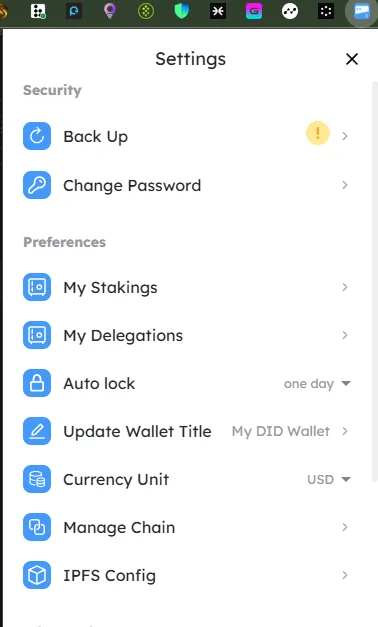
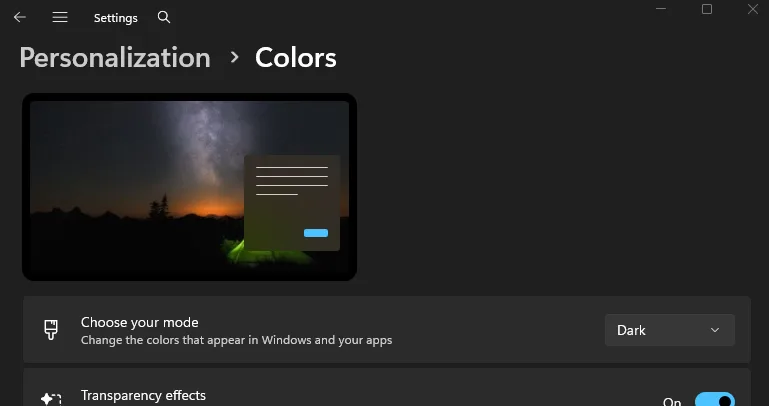
When using the DID Wallet desktop application, the interface is always displayed in light mode, even when the system theme is set to dark mode. There is no available option in the settings to manually switch between light and dark modes.
🔁 Steps to Reproduce
- Open the DID Wallet desktop application.
- Ensure your operating system theme is set to Dark Mode.
- Observe the app interface.
- Try to find a theme switcher or dark mode option — none is available.
✅ Expected Behavior
- The application should automatically detect and match the system theme (dark/light).
- Alternatively, a manual theme selector (Light / Dark / System Default) should be available in the settings.
❌ Actual Behavior
- The app always displays in light mode, regardless of the system’s dark mode setting.
- No visible theme toggle or customization option in the settings.
🧰 Environment
- Platform: DID Wallet Desktop
- OS: Windows 11
- Theme: System set to Dark Mode
- Version: Latest (as of October 2025)
- Reproducibility: 100%
📊 Impact
- Severity: Low to Medium
- Impact: Reduces user comfort in low-light environments and breaks system theme consistency.
- UX Impact: Users expect dark mode support, especially for crypto and developer tools.
🧠 Suggested Fix
- Implement a theme synchronization feature to match OS-level settings.
- Add a manual toggle in Settings (Light / Dark / System Default).
- Use a persistent theme preference (e.g., stored in localStorage or user config).
2 replies
I suggest fixing it asap so I can use the didwallet compatible with my eyesight
Thank you for your suggestion. We will evaluate it and consider supporting it in the future.