
Unable to Open or Copy Phone Number in Notifications Page

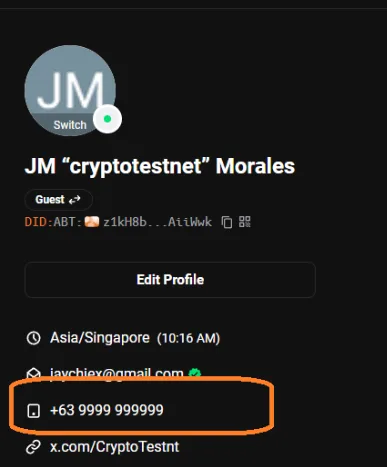
🧾 Summary: When users access the notifications page on the ABT Network main site, the phone number field cannot be opened, viewed, or copied. This prevents users from managing or verifying their contact information within the notification settings page.
🧩 Affected Component: User Notifications → Contact Information (Phone Number Field)
🧪 Steps to Reproduce:
- Log in to main.abtnetwork.io.
- Navigate to:
/.well-known/service/user/notifications?severity=&componentDid= - Locate your phone number section.
- Attempt to open, view, or copy the number.
🧠 Actual Result:
- The phone number field is unresponsive — cannot be opened or copied.
- No error message or feedback appears on user interaction.
✅ Expected Result:
- The user should be able to view and copy their registered phone number.
- A contextual menu or “copy to clipboard” option should appear upon interaction.
💥 Impact:
- Users cannot confirm their registered number for verification.
- Limits usability for contact-based notifications or security verification.
- Creates confusion for users attempting to manage their notification settings.
⚙️ Suggested Fix:
- Review frontend event listeners or permission controls for the phone number field.
- Enable proper clipboard interaction or display in a read-only text box.
- Provide a tooltip or icon for “Copy Phone Number” functionality.
🧱 Proof of Concept (POC):
- Tested using Chrome (Windows 11).
- Phone number displayed but not selectable or interactive.
- No console error, but no copy response triggered either.
📚 Reference:
- ABT Network User Notification Service
.well-known/service/user/notificationsendpoint
⚠️ Severity Classification:
- Severity: Low–Medium
- Priority: Medium
- Category: UI / UX / Accessibility