
"Passport Not Found" Error in DID Wallet and Blocklet Integration

Issue Description: When attempting to recover or access my "passport" via the Blocklet platform using DID Wallet, the process fails with an error message stating "Passport not found." This occurs despite having an active wallet and account connected. Suggested troubleshooting steps, such as logging out and back in or switching wallets, do not resolve the issue.
Steps to Reproduce:
- Open the Blocklet platform and navigate to the "Recover Passport" page.
- Attempt to recover or access the passport using a DID Wallet account.
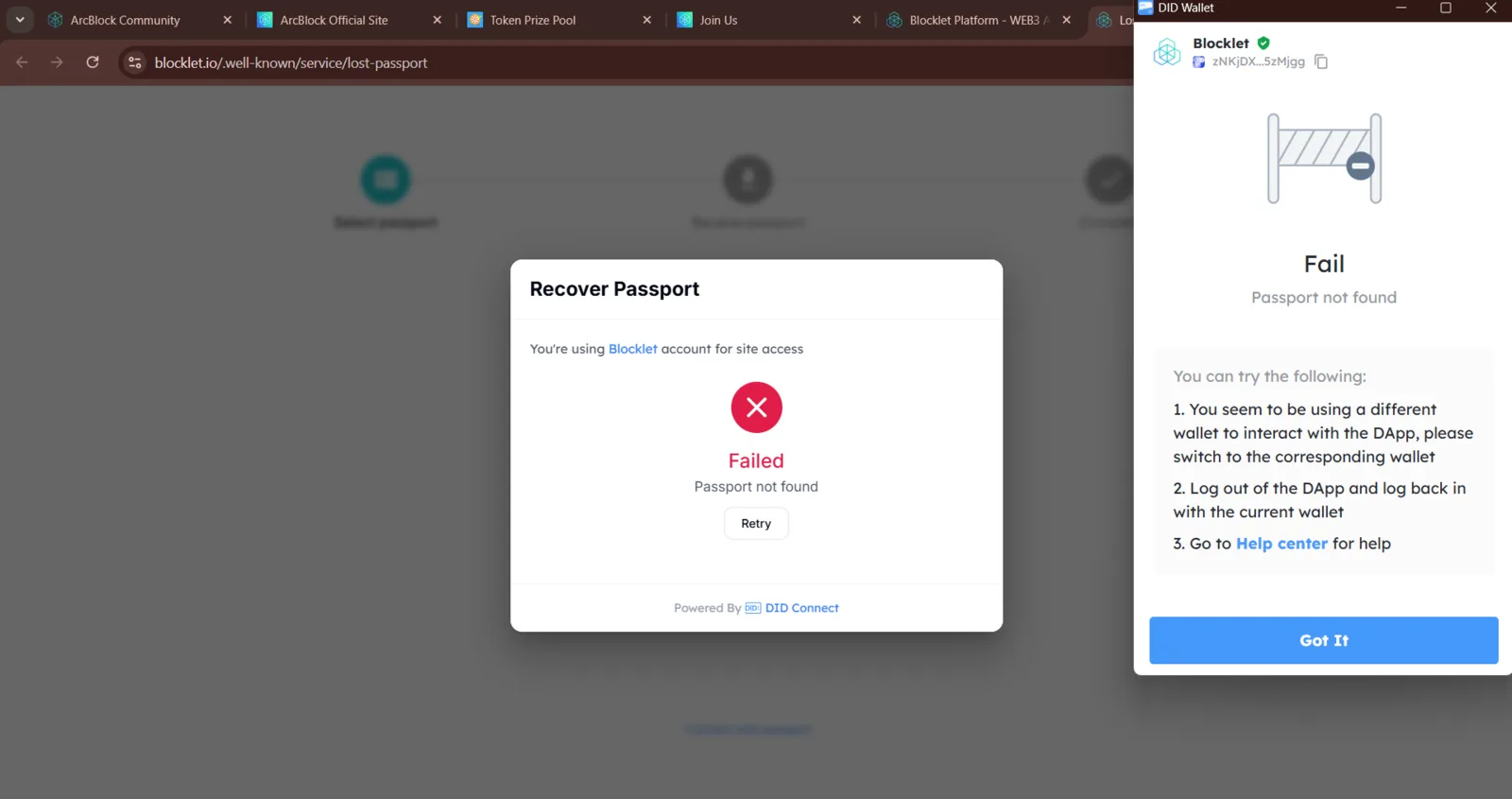
- Observe the error message:
- On Blocklet: "Failed: Passport not found."
- On DID Wallet: "Fail: Passport not found."
- Attempt the suggested steps provided by the interface, including switching wallets and logging out/in. The issue persists.
Additional Notes: This issue may be caused by a failure in data synchronization between Blocklet and DID Wallet or an account-linking issue. The error message does not provide clear guidance on how to resolve the issue, leading to user confusion and inability to proceed.
Attachments:
- Screenshots showing the "Passport not found" error on both Blocklet and DID Wallet interfaces.
2 replies
The error is thrown when there are no passports for connected user on the blocklet.
The error message need to be refined to avoid confusion.
Improved and deployed