
Platform & Device Type Display as "Unknown" on Aistro Session Management

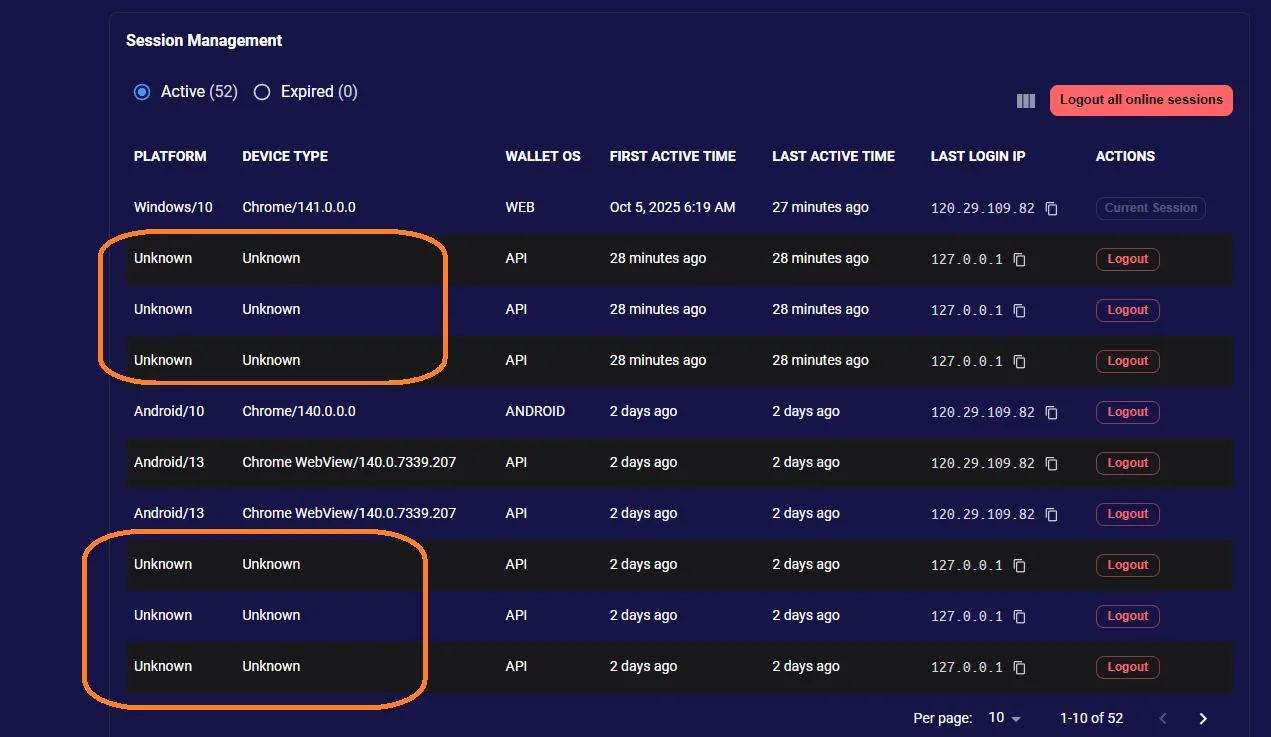
🧾 Summary: Under Session Management, both Platform and Device Type fields show “Unknown”, even though the session was created from a valid device and browser.
🧪 Steps to Reproduce:
- Log in to your Aistro account.
- Go to: 👉 https://www.aistro.io/.well-known/service/user/settings?locale=en
- Scroll down to the Session Management section.
- Observe the Platform and Device Type columns.
💥 Actual Result:
- Both Platform and Device Type show “Unknown” for sessions.
✅ Expected Result:
- Platform and device type should correctly identify the user’s environment, for example:
- Platform: Windows, macOS, Android, iOS
- Device Type: Desktop, Mobile, Tablet
⚙️ Possible Cause:
- User-Agent data not being parsed correctly.
- Missing or outdated device detection logic in session tracking module.
- Backend session record missing platform/device mapping fields.
🧱 Severity: 🟠 Moderate 🎯 Priority: Medium 📂 Category: Session Management / Device Detection
💡 Suggested Fix:
- Integrate a User-Agent parser (e.g.,
ua-parser-jsordevice-detector-js) to detect OS and device type accurately. - Ensure backend captures and stores the platform/device data upon login session creation.
- Display parsed results in the Session Management UI.
1 reply
In fact, we have already used the UA parser-related libraries; the "unknown" shown here is actually due to some issues with the recorded data.
We will properly consider how to optimize this issue, but it is not a high priority.