
Missing "Close" Button on Feature Tooltip

Issue Summary
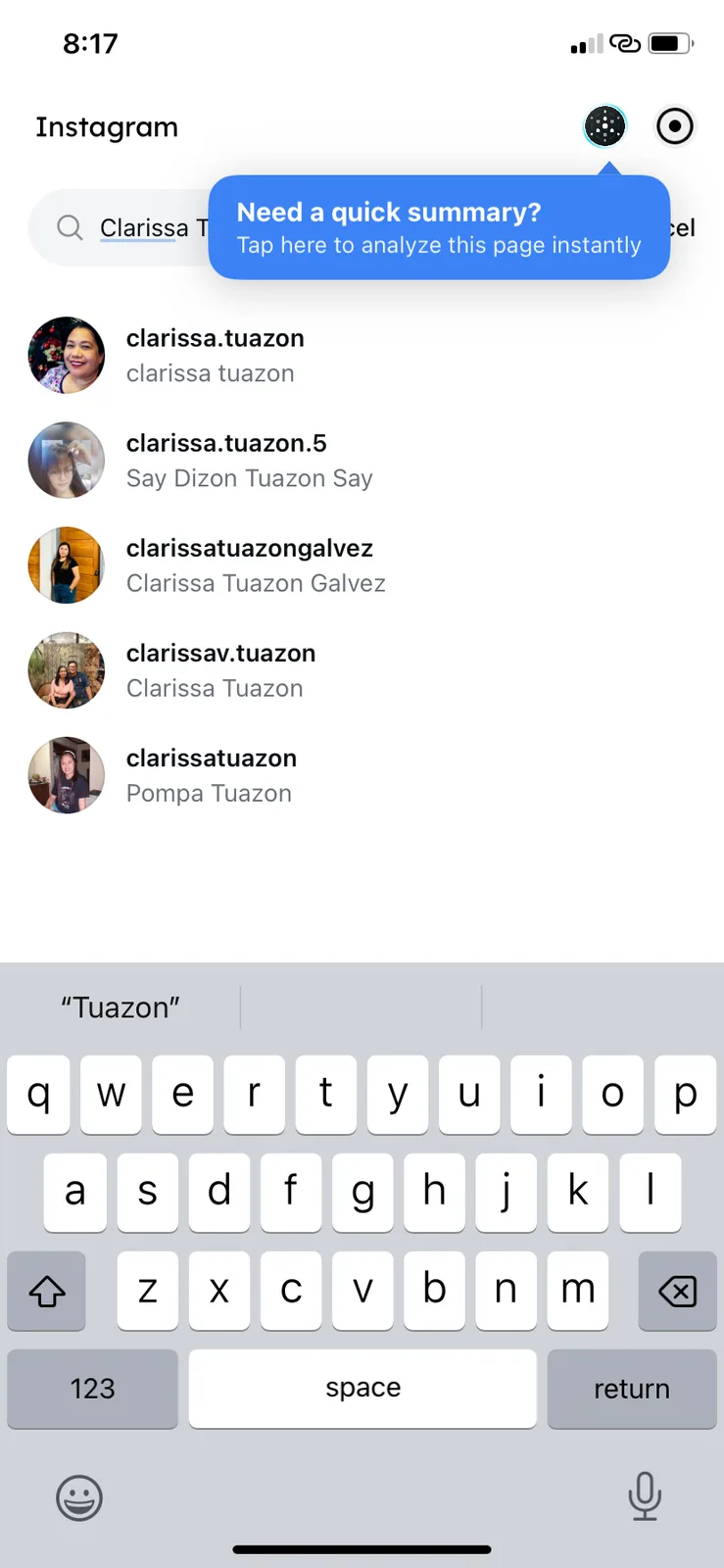
The "Need a quick summary?" tooltip (onboarding/feature callout) lacks a close or dismiss button ("X"). On a new installation, this forces the user to either interact with the feature or wait for an unknown trigger to dismiss it, which obstructs the underlying UI (Instagram search results).
Environment
- App: ArcSphere (Version 1.11.0)
- Device: iPhone XR
- OS Version: iOS 18.7.3
- State: Fresh Install / First Use
Steps to Reproduce
- Install and open ArcSphere for the first time.
- Navigate to a page where the "Summary" feature is applicable (e.g., an Instagram profile/search page).
- Observe the blue tooltip prompt: "Need a quick summary? Tap here to analyze this page instantly."
- Attempt to dismiss the prompt without clicking the primary action.
Expected Result
The tooltip should include a small "X" in the corner or allow for dismissal by tapping anywhere else on the screen (outside the bubble) to ensure it doesn't block the user's workflow.
Actual Result
There is no visible close button. The tooltip remains active and overlays the top portion of the screen, potentially obscuring navigation or search elements.