感谢反馈,这边没有复现您说的现象,请确认下你录屏中这样切换属性的类型吗? 并不会导致参数被清空
希望能提供更多的信息,比如您的操作流程,您希望的结果是什么,谢谢。
不好意思,没有描述清晰,演示请看上面视频
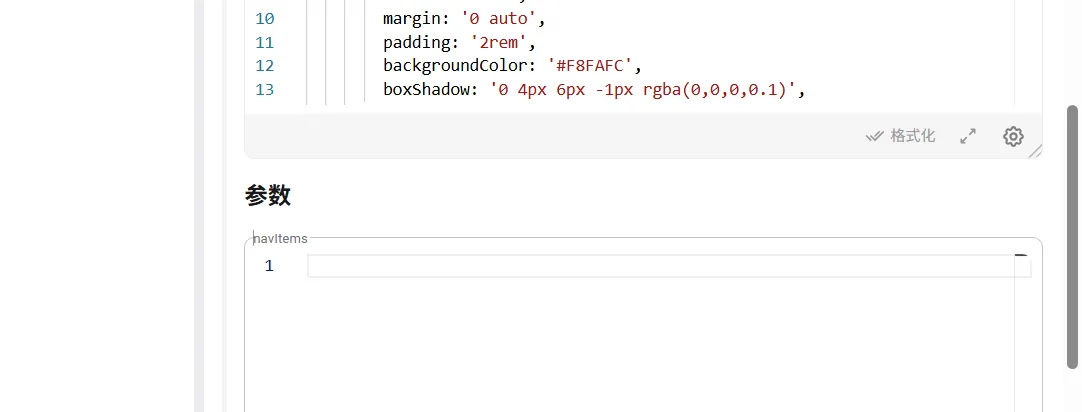
键:navItems 参数类型:JSON
问题1:主页导航组件设置参数内容-->点击页面模板查看->再次点击主页导航组件,此时参数被清空 问题1期望:即使切换其他,希望保留我的参数,不用每次都要重新输入才能进行调试组件
问题2:两个组件相互切换的时候,重新设置主页导航组件参数,页面没有被实时渲染出来
问题2期望:设置参数之后能够实时渲染
测试代码:
 import React from '@blocklet/pages-kit/builtin/react';
import { Box, Grid, Typography, Link, Card, CardContent } from '@blocklet/pages-kit/builtin/mui/material';

export default function Navigation({ navItems=[] }) {

  return (
    <Box
      sx={{
        maxWidth: 1200,
        margin: '0 auto',
        padding: '2rem',
        backgroundColor: '#F8FAFC',
        boxShadow: '0 4px 6px -1px rgba(0,0,0,0.1)',
      }}>

      <Grid container spacing={3} justifyContent="center">
        {navItems.map((item) => (
          <Grid item xs={12} sm={8} md={4} lg={2} key={item.id}>
            <Link
              href={item.href}
              component={Card}
              sx={{
                textDecoration: 'none',
                height: '100%',
                transition: 'transform 0.3s, box-shadow 0.3s',
                '&:hover': {
                  transform: 'translateY(-5px)',
                  boxShadow: '0 10px 15px -3px rgba(0,0,0,0.1)',
                },
              }}>
              <CardContent
                sx={{
                  display: 'flex',
                  flexDirection: 'column',
                  alignItems: 'center',
                  p: 3,
                  backgroundColor: item.color,
                  color: 'white',

                  position: 'relative',
                  overflow: 'hidden',
                }}>
                <Typography
                  variant="h6"
                  sx={{
                    fontSize: '1.2rem',
                    fontWeight: 600,
                    mb: 1,
                    textTransform: 'uppercase',
                    letterSpacing: '0.05em',
                  }}>
                  {item.label}
                </Typography>
                <Box
                  sx={{
                    position: 'absolute',
                    bottom: 0,
                    left: 0,
                    right: 0,
                    height: '40%',
                    background: 'linear-gradient(transparent, rgba(0,0,0,0.3))',
                  }}
                />
              </CardContent>
            </Link>
          </Grid>
        ))}
      </Grid>
    </Box>
  );
}
测试参数:
[
  {
    "id": 1,
    "label": "首页",
    "href": "/",
    "color": "#4F46E5"
  },
  {
    "id": 2,
    "label": "产品",
    "href": "/products",
    "color": "#10B981"
  },
  {
    "id": 3,
    "label": "解决方案",
    "href": "/solutions",
    "color": "#F59E0B"
  },
  {
    "id": 4,
    "label": "文档",
    "href": "/docs",
    "color": "#EF4444"
  },
  {
    "id": 5,
    "label": "案例",
    "href": "/cases",
    "color": "#3B82F6"
  },
  {
    "id": 6,
    "label": "关于我们",
    "href": "/about",
    "color": "#8B5CF6"
  }
]
好的,感谢反馈
这个重现到了吗?
我们修改优化这实现,实现了:
请生成 Pages Kit 最新版本体验。


6 replies
感谢反馈,这边没有复现您说的现象,请确认下你录屏中这样切换属性的类型吗? 并不会导致参数被清空
希望能提供更多的信息,比如您的操作流程,您希望的结果是什么,谢谢。
不好意思,没有描述清晰,演示请看上面视频
键:navItems 参数类型:JSON
问题1:主页导航组件设置参数内容-->点击页面模板查看->再次点击主页导航组件,此时参数被清空 问题1期望:即使切换其他,希望保留我的参数,不用每次都要重新输入才能进行调试组件
问题2:两个组件相互切换的时候,重新设置主页导航组件参数,页面没有被实时渲染出来
问题2期望:设置参数之后能够实时渲染
测试代码:
测试参数:
好的,感谢反馈
这个重现到了吗?
我们修改优化这实现,实现了:
请生成 Pages Kit 最新版本体验。