
Voting Blocklet

Hello Team,
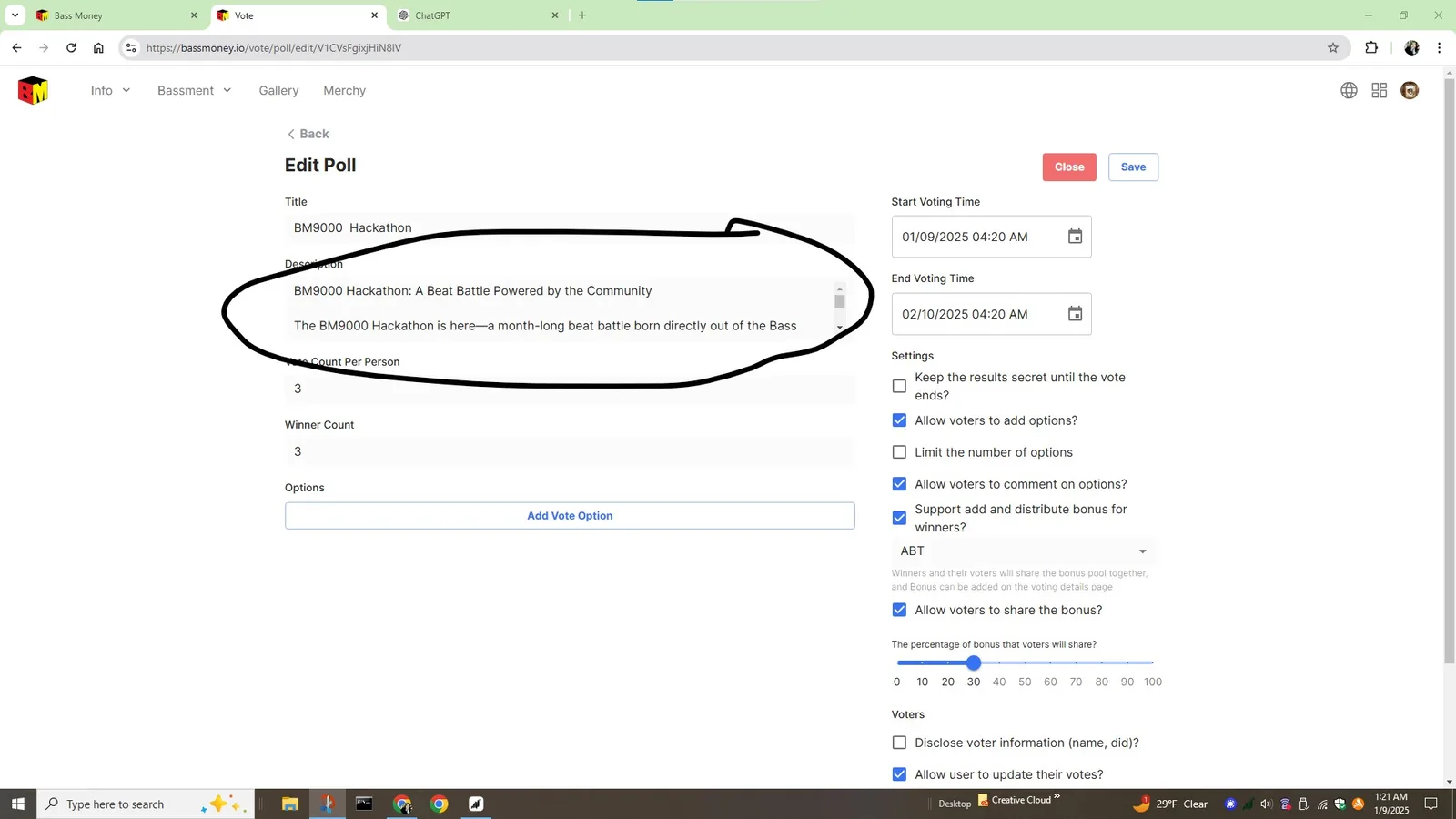
This window for voting description is very small and hard to use. Please consider making a larger version.
Thank you
Hello Team,
This window for voting description is very small and hard to use. Please consider making a larger version.
Thank you
14 replies
z1QxEMzv8LVaScSBXcqqXvmkVbDTPVaprGJ we can make this input area dynamic?
ok, I'll fix it in the next version
Thanks.
Also the area where we add voting options. Is there currently a way to hyperlink our entries?
for example our entries will be links to twitter posts. Those links can not be clicked when added as voting options. Our users will have to copy and paste.
Would be cool if the links we put in as options could just be clicked.
looking at it now on my phone, the link that I have as current option is not easily copied on my phone
BM9000 Hackathon: A Beat Battle Powered by the Community
This is a good idea, we can consider support this idea in future versions.
not be pushy, but any idea when that may happen.
Looking at my current vote set up I don’t know if it will work without this function.
My vote is live For one month. And we are rewarding abt.
Having this feature for this would be amazing.
What you think?
Maybe next week, we will give you a feedback notice after the schedule is completed.
Thank you I appreciate any consideration. we have a lot of momentum right now and I was trying to capitalize on it.
I should have checked this beforehand.
Thank you for your feedback, we will handle it as soon as possible.
I thought I was going to be able to use blocklet because on my desktop it was easy to copy and paste link.
On the phone it is very difficulT/near impossible
z1QxEMzv8LVaScSBXcqqXvmkVbDTPVaprGJ another thing you may want to consider is the "close button". It confused me a little.
It appears next to the "save" button when you choose to edit your vote. Because it shows up next to the save button, I assumed that "close" meant close without saving. When I pressed it I was not given any type of warning that I was in fact closing my vote. Then I pressed it and a big closed stamp showed up on my voting page.
I sort of panicked, then realized I just needed to adjust my start date and it would reopen.
Perhaps some additional indictiation that the "close" button means close down the vote entirely could help alleviate this from happening to new users in the future.
z1VV21NqNWkiadznN32ALkos5dQqQwnCMty
z1UBqTWERpY3cKSoyJsoHzB9bepuYUfrN22
OK, I will adjust this logic.
hi these issues have been fixed in the latest version 0.7.25
Awesome. The display window is much easier to navigate. The links work great! Thank you!!!
Seriously. Yall are doing an amzing job. Thank you for making this a priority. It really helps with our project!