
Hamburger Menu in Favorites Not Working

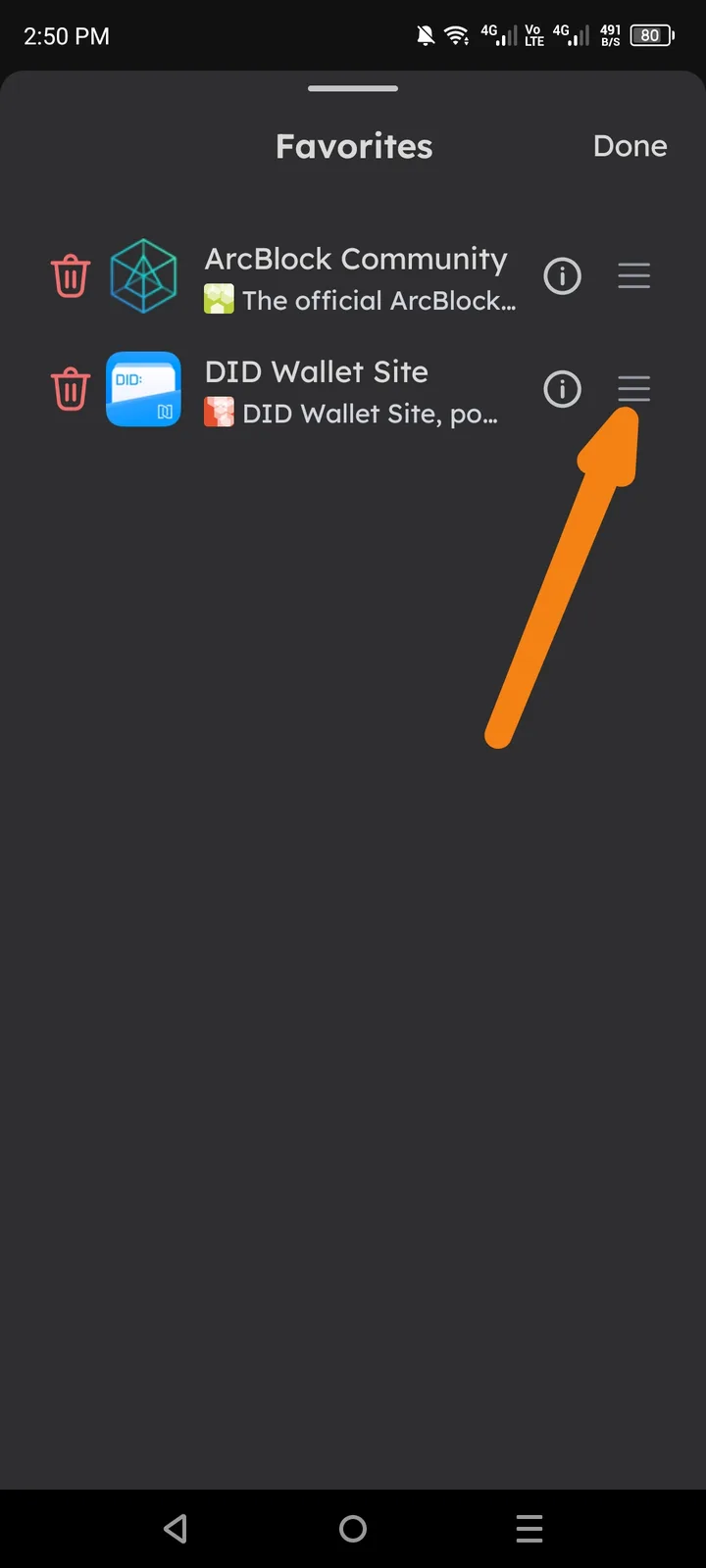
🧾 Summary: The hamburger menu icon inside the Favorites section is not functional. When tapped, nothing happens — no menu or options appear.
🧪 Steps to Reproduce:
- Open the DID Wallet app.
- Go to the Favorites tab or section.
- Tap the hamburger (☰) icon.
- Observe the behavior.
💥 Actual Result:
- The hamburger icon does not respond.
- No dropdown or sidebar appears.
- No error message or visual feedback is provided.
✅ Expected Result:
- The hamburger icon should open a menu or provide options related to Favorites (e.g., sort, filter, edit, remove).
- The UI should give clear feedback when tapped.
⚙️ Possible Cause:
- Missing or broken
onClickevent binding for the hamburger icon. - UI layout overlay blocking the tap zone.
- JavaScript or React component event listener not triggered in this view.
🧱 Severity: 🟡 Minor 🎯 Priority: Medium 📂 Category: UI / Navigation / Functionality
💡 Suggested Fix:
- Check if the hamburger icon has a valid
onClickoronPressevent handler. - Ensure the menu logic is loaded in the Favorites view.
- Test across Android and iOS to confirm consistent behavior.
- Add visual feedback (button highlight or animation) for better UX.