
Asymmetric Tab Control (Able to Open but Unable to Close Twitter/X)

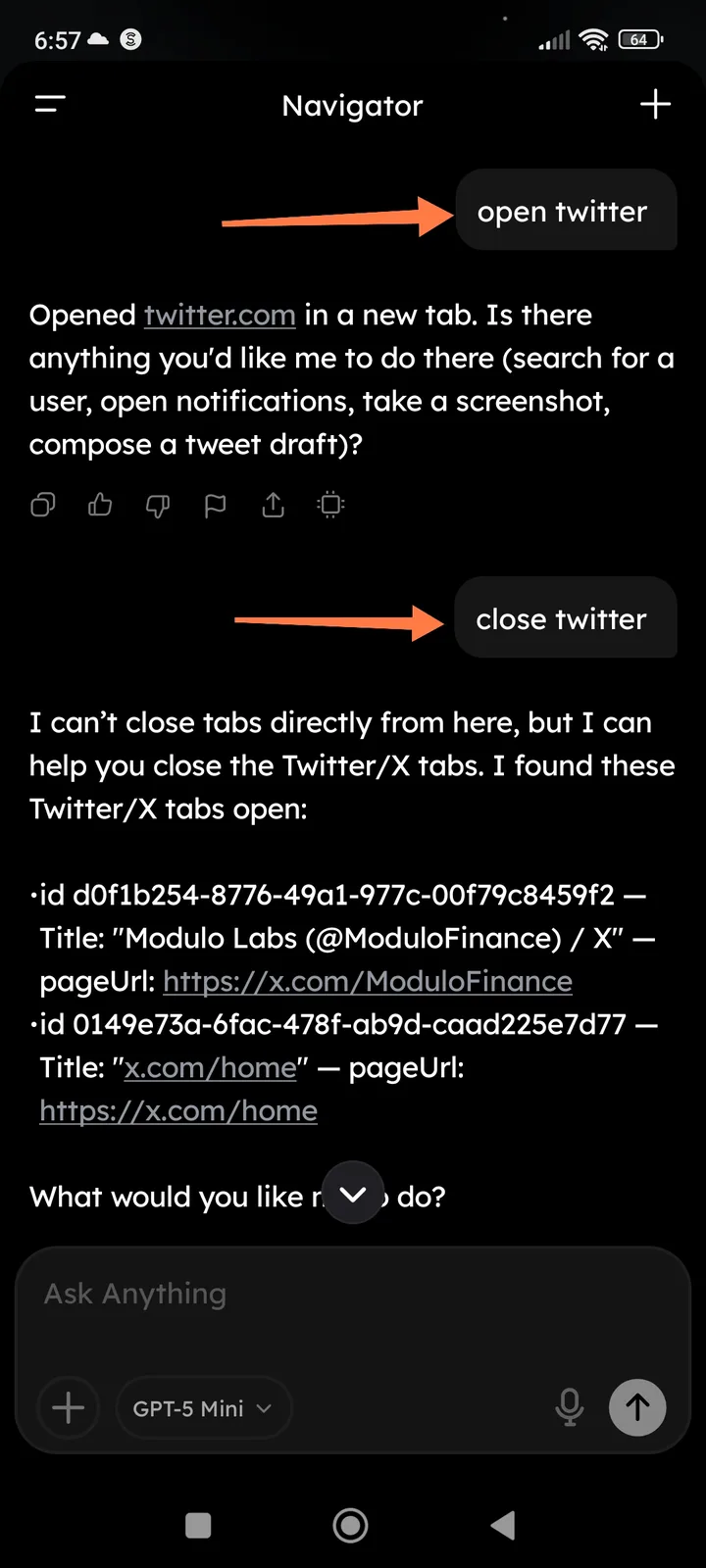
Description
The Arcsphere "Navigator" interface successfully executes the command to open Twitter/X in a new tab, but fails to execute the corresponding command to close Twitter/X tabs. When the "close" command is issued, the assistant acknowledges the open tabs but states it "can't close tabs directly from here," creating a discrepancy in the tool's perceived capabilities and user experience.
Steps to Reproduce
- Open the Navigator interface in Arcsphere.
- Input the command: "open twitter".
- Result: The app successfully opens twitter.com in a new tab and provides a confirmation message.
- Input the follow-up command: "close twitter".
- Result: The app identifies the open Twitter tabs (e.g.,
id d0f1b254...andid 0149e73a...) but refuses to close them, stating it lacks the direct permission.
Expected Behavior
If the assistant has the integration permissions to open and manage browser tabs, it should also have the capability to close them upon a direct user command, or at least provide a one-click "Confirm Close" button rather than just listing the tab IDs.
Actual Behavior
The assistant provides a list of open tab IDs (e.g., Modulo Labs on X) but provides no functional way to terminate those sessions within the chat interface, requiring the user to switch back to their browser and close them manually.